
If you’re a car racing fan, then a realistic racing simulator game can be the one for you. Assetto Corsa is one of the popular racing simulator game developed by KUNOS-Simulazioni Srl. If you’re already playing the game, then you’ll probably know the importance of the Field of View (FOV) settings. However, if you don’t know what FOV is and what are the best settings for it, then we’ve got you covered.
What is Field Of View?
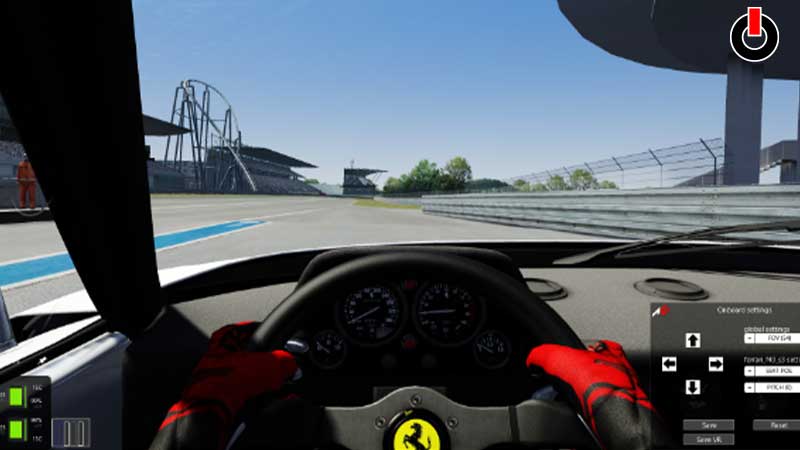
If you’re a newbie and don’t know what FOV is, then here’s a quick summary for you. It is the view from your virtual driver’s seat that you see on your screen. There are various FOV settings that you can tweak and enhance your driving experience. The best Field of view setting will make your driving smoother with a better judgment of tracks, breaks, etc. If you don’t know how to change the settings, then here’s how you can do it.
How To Change Settings in Assetto Corsa?
For changing the FOV settings in the game, follow the steps mentioned below.
- First, Open and Start a game in Assetto Corsa.
- After starting the game, simply pause it and go to the Adjust Cockpit View.
- Then, here you’ll see a Triangular Logo with a Numerical Degree located on the bottom.
- After that, just go ahead and change settings according to your preference.
What Are The Best FOV Settings for Assetto Corsa?
There is no ideal Field of view settings for the game. That’s because it differs for every player and also depends on their device setup. So you can only figure out the best FOV settings by playing the game more often. However, players can also figure out the settings by calculation.
How to Calculate Field Of View Settings?
Before starting the calculation, here are some points that you should collect data on.
- Size of your Monitor.
- Distance of your eyes from the screen.
- Game’s aspect ratio.
After determining the data based on the points mentioned above, go to the Modern FOV calculator site and enter the data accordingly. After that just sit back and experience the most realistic racing simulator game.
This is all you need to know about the FOV settings in Assetto Corsa. If you want to play racing games on your phone, then here’s a list of the best car racing games for Android. Go ahead and check them out.