
Do you want to unlink your email from PUBG Mobile? If yes, then you are in right place. In this article, we will help you with all the steps to remove access from PUBG MObile.
Even if you uninstall the application or deactivate your account PUBG Mobile still has access to all your personal information. This stays until you do not go and remove access from your Gmail or any other email account. To avoid the breach of privacy and protect your data we need to remove all the access from your google account.
It is a very simple process and can be completed by following a few easy, simple steps. Check out the steps given below and learn how to unlink your email from PUBG Mobile or any other third-party application.
Steps To Unlink Your Email ID From PUBG Mobile:
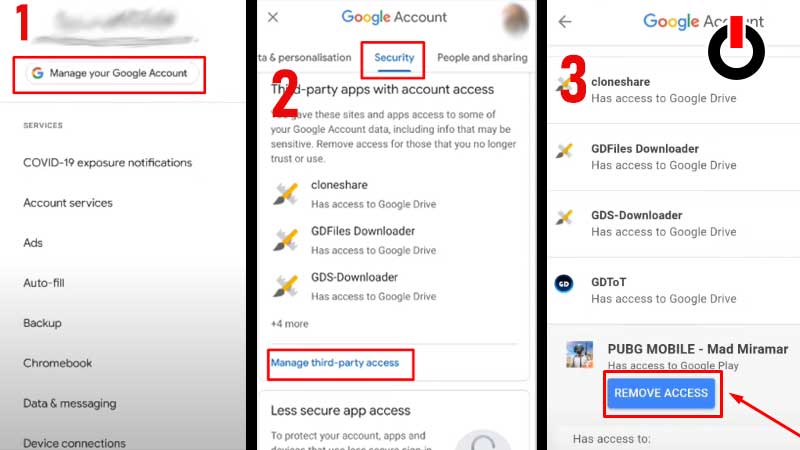
Here are all the steps to remove access to PUBG Mobile from your email. Follow the steps correctly and unlink your email ID successfully.
- Open Settings on your Mobile and look for Google.
- Now, select the email account that you have linked with PUBG Mobile and hit the ‘Manage Your Google Account’ option below it.
- A new window will open, scroll horizontally and go to ‘Security’.
- Once you get there, scroll down and click on ‘Manage Third-Party Access’
- Here you will find the list of all the applications that are registered on your email ID.
- Click on PUBG Mobile and hit on ‘Remove Access’ button below it.
- This will unlink your email ID from PUBG Mobile and delete all the data registered on the same.
How To Save Your Game Progress In PUBG Mobile?
If you unlink your account then it is quite obvious to lose all your data and progress that was saved on it. To avoid that, before you follow the above steps link your PUBG Mobile account to any other Social Media account.
This will not only save your progress but also help you from all the annoying emails on your ID. That’s all for this one check out another article on how to get Pacifist Title in PUBG Mobile.