
Battlegrounds Mobile India (BGMI) is now available to download on Google Play Store and anyone can download it for free. Similar to its Global version, Battlegrounds Mobile India does need you to have a rename card to get your name changed.
For the unversed, the price of rename card in BGMI is 180 UC. Since UC can never be obtained by redeeming codes, there are tons of BGMI users who have been having trouble obtaining rename cards in BGMI and if that’s you then look no further as we have got you covered.
How to get rename card for free in BGMI
Those who download BGMI and play it on Android for the first time will get an option to transfer their data from the Global version to the Indian version of PUBG Mobile. The data that you can transfer from the Global to Indian version are nicknames, character ID, achievements, UC, and more.
Krafton is providing rewards to users who are transferring data from the Global version to BGMI. Among the rewards that users will get is a rename card.
To get a rename card in Battlegrounds Mobile India, follow the given steps:
- Once you have successfully downloaded the APK file of BGMI from Google play, open the game and log in using the preferred social network.
- Make sure to accept the Privacy Policy and Terms of Service after going through them while logging into the game for the first time.
- During the process, you will be asked to select a character. Once selected, a dialogue box will appear on the screen, asking your country’s name.
- If you reside in India, click on the YES button to proceed.
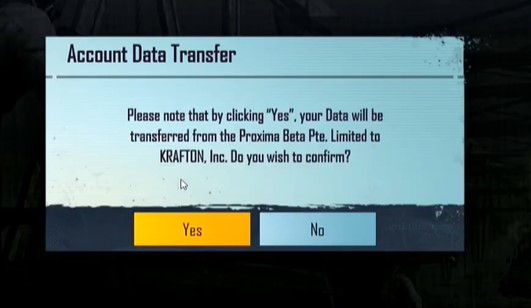
- Next, you will be asked whether you want to transfer your data from PUBG Mobile to BGMI. If you want then press YES to continue to process.
- Now, you will be asked to select the social network that you had linked with PUBG Mobile to log into the game. Notably, you can only transfer data through Facebook and Twitter.
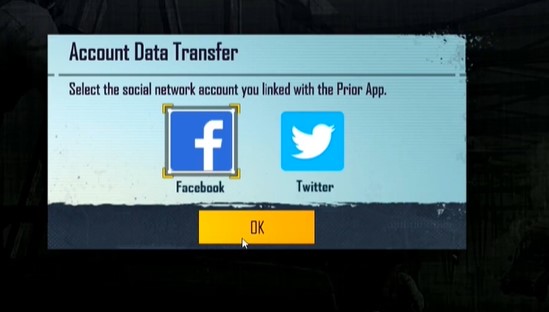
- Select the preferred social network to log in and tap on YES to begin the data transfer process.
- Once you have successfully migrated your data from PUBG Mobile to BGMI, you will get a rename card as a reward.
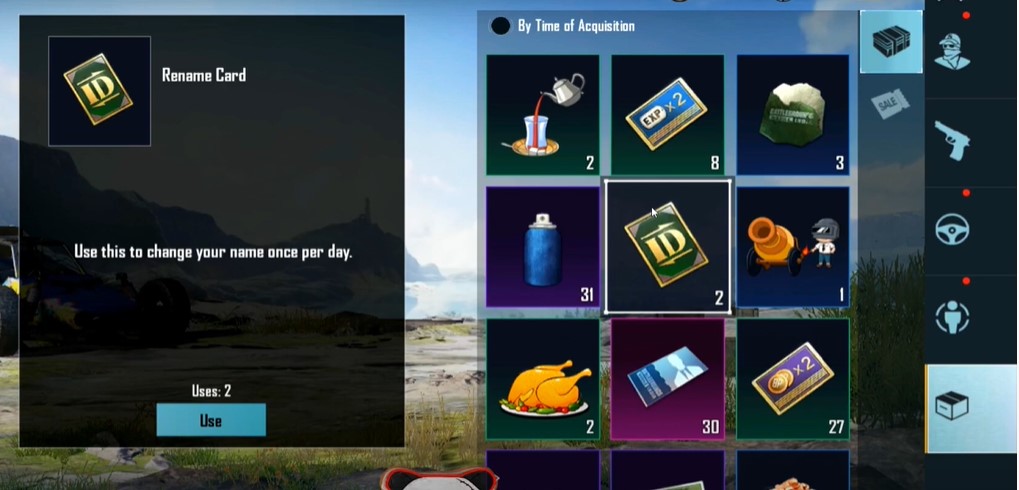
- Once obtained, you can claim it and use it to change your name in Battlegrounds Mobile India.
That’s everything you need to know about how to get a rename card for free in BGMI.