
Held Items in Pokemon Unite are like a booster for Pokemon. It gives your Pokemon some additional power that is not part of their evolution. There are many items with a variety of effects, they can be earned from the free Gacha system, battles, and events. They can prove effective at higher levels, especially during events. So, here is how to upgrade Held Items in Pokemon Unite.
How to Upgrade Held Items in Pokemon Unite
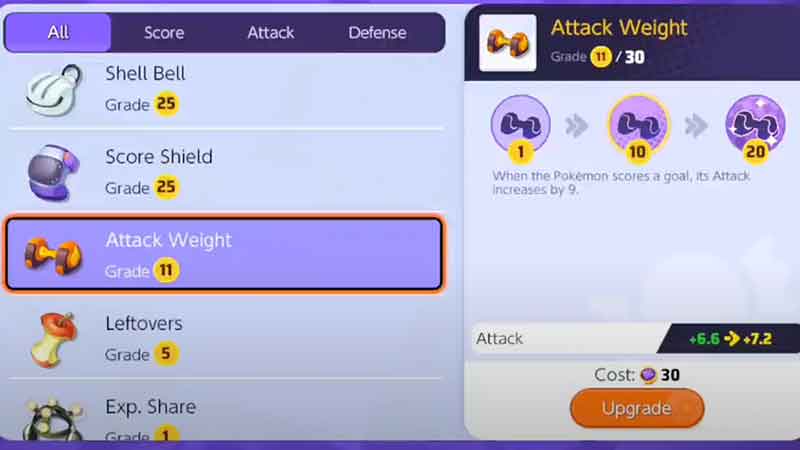
Held items are upgraded using Item Enhancer. And Trainers at level 9 or above have the feature of upgrading their items. Every Pokemon can hold or equip up to three items. And their max upgrade is Grade 30 as of now. You start gaining immense profit from Grade 20 itself. So let’s check out the steps for upgrading your Held Items in Pokemon Unite.
- Open your Pokemon Unite app and go to the Main Menu.
- Now, on the upper left corner of your screen, you will see your profile icon. Tap on it.
- It will take you to the battle preparation tab, scroll down and look for a candy-like system of Held Items. Select that option.
- Now, you will see two options on the left side of your screen. Choose the second option: “All Held Items“.
- Now scroll and look for the item you wish to upgrade.
- Once you select the item, you will see its detail on the right side of your screen.
- On the bottom of the detail window is the “Upgrade” button, with the required Item Enhancers mentioned right above that option.
- The detail window will also show how much that item’s stats or power will increase after the upgrade. Such as, if your Score Shield is at Grade 25, you will see +375 > +390.
This is how to upgrade Held Items in Pokemon Unite. If you found this helpful. Then check out the list of Status Effects and Draft Pick guide.