
You must have seen in the Pokemon series that many trainers roam around with their Pokemon as a companion. The best part is that in this simulator game, even you can go around the map with your Pokemon. Well, the Pokemon that you select as a companion is called Buddy Pokemon. And in this guide, you will learn how to adventure with buddy Pokemon in Pokemon Go.
In this guide, we have covered the steps that you can follow in order to set your buddy Pokemon and go on an adventure with it.
How to Adventure with Buddy in Pokemon Go?
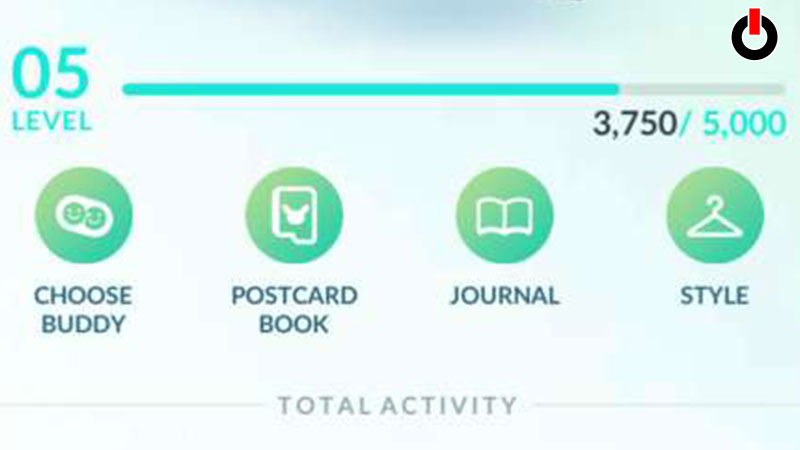
If you’re wondering what it means to go on an adventure with a buddy in Pokemon Go, it means that you have to select one of the Pokemon that you’ve captured and spend time together. Below we have mentioned the steps of how to add your buddy Pokemon to the game.
However, these steps will be useful to you if you’re choosing your buddy for the first time. Follow the steps given below.
- Launch Pokemon Go on your phone
- On the Main Screen, click on your Profile
- Click on the Choose Buddy option
- Among the list of your Pokemon, select one
In this way, you can select your buddy and roam around with it. If you’ve already chosen your buddy and want to change it, follow the steps given below.
- Launch Pokemon Go on your phone
- On the Main Screen, click on your Profile
- Click on the Buddy History option
- Scroll down and click on the Swap Buddy option
- Select a Pokemon
And you will have changed your buddy Pokemon. Once you’ve done this, you are free to go on an adventure with your buddy in Pokemon Go. Hopefully, this guide was helpful to you. While you’re here, you can go ahead and check out other similar articles such as How to Use XL Candy in Pokemon Go and How to Accept Raid or Remote Raid invite?