
Project Zomboid is a zombie apocalypse game that has players fighting for survival. Cars can prove quite useful when trying to survive in the game. Whether players are running from a horde of zombies or running them over, cars definitely increase a player’s survival rate. However, even if players do locate a car, they will need to hotwire it to make their daring getaway in Project Zomboid. This is not a very difficult task. Read on to find out how to hotwire a car in Project Zomboid.
How To Hotwire A Car In Project Zomboid?
Players will need to find a car before they can hotwire it. Players can find cars parked near the local shop or in the car park. Car parks can usually be found near buildings like schools and gas stations. While it is possible to get lucky and find the keys on the ground or inside the car, most of the time players will have to enter the car without a key. Here’s how players can get in the car without car keys.
Getting In The Car Without Car Keys
- Move near the door of the car.
- Right-click and select smash the window.
- Select the window on the other side of the driver’s seat to smash.
- Smashing the window without a weapon will cause injury. Get a weapon to smash the windows instead.
Hotwiring A Car
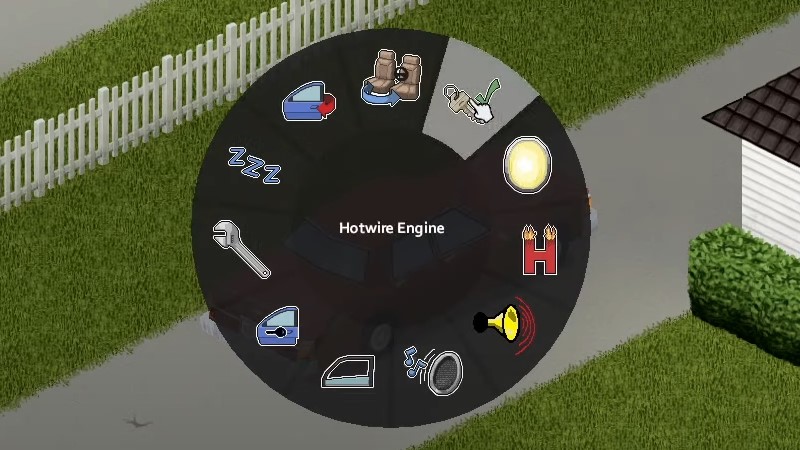
New characters will need to level up their skills before they can hotwire a car. If the player has an insufficient skill, the game will show a message “You need keys or Electrical level 1 and Mechanics level 2 to hotwire”. Once players have the necessary skills they can follow the steps given below to hotwire a car in Project Zomboid.
- Get in the car in the driver’s seat.
- Press V to open the vehicle menu.
- Choose the option to ‘Hotwire Engine’.
- Wait as the character tries to hotwire the car. Unsuccessful attempts can result in loud noises that attract zombies. Players can attempt to hotwire a car in Project Zomboid as many times as they like.
- If the hotwiring is successful and the car gas fuel, players will now be able to drive the vehicle.
Players that want to hotwire a car straight away in Project Zomboid can do so by choosing the Burglar profession. This gives them the ability to Hotwire cars with no skills required. This is how you can survive the zombie apocalypse in Project Zomboid by hotwiring a car.
Sneaking is a useful skill that can help players avoid a lot of zombies in the game. Read How To Sneak In Project Zomboid to help you along. If you’d like to breeze through the game with cheats, here’s all the Project Zomboid Cheats for your perusal.