
Outlook serves as a personal information manager software system from Microsoft. With its help, users can organize their mail to focus on the important messages. In addition, users can also manage and share their calendars to schedule meetings as well as share files from the cloud. However, users will need to verify their Outlook account when they register for a new account or ad an existing one. If you’re not sure how you can verify your Outlook account, follow the steps below to do it with ease.
How to verify your Outlook account?
- Log Into the Outlook account.
- Click the profile icon in the upper-right corner.
- Select View account.
- Click on Info.
- Click Manage Sign-in email or phone number.
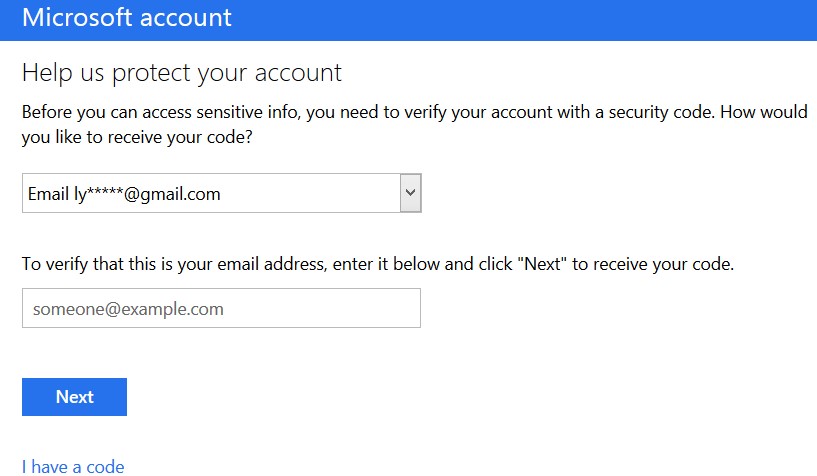
- Choose a method to verify the account.
- Select either E-mail, where you will be asked for an alternative email id, or Text where Outlook will ask for your number to verify the account.
- Enter the chosen information and select Send code.
- You will either receive an email or a text message with the confirmation code.
- Enter the code and click Verify.
- Next, Click Verify and follow the instructions.
- Your account should now be verified.
This is how users can verify their Outlook account with ease. However, for their own added security, users should also enable the Two-Step verification for their account. To set up a Two-Step verification for your Microsoft account, read below.
Two-Step verification
- Log on to the Microsoft Account Management website.
- Click on Security at the top.
- Click on the link ‘More security options on the right.
- Verify the account through the security code.
- Click on Set up two-step verification
- Follow instructions to complete.
This is how users can verify their account and set up two-step verification to ensure their security. To know more about how users can fix the Outlook Mail connectivity error, read Hotmail Server Down – How To Fix Outlook Mail Connectivity Error?. Moreover, if your Hotmail is not working on your iPhone, here’s how you can fix it.