
CoinDCX is undoubtedly one of the most popular India’s cryptocurrency exchanges and millions of people are using it to buy and sell Bitcoin and other cryptocurrencies at the moment. There are numerous users who want to delete their CoinDCX account for various reasons. Similar to creating an account, deleting CoinDCX accounts is not as simple as it sounds.
That could be the reason why a lot of users are struggling to delete their CoinDCX account. If you too have made your mind to delete your CoinDCX account but don’t know how it is done then look no further as we have got you covered.
Without any further ado, let’s get started:
How To Deactivate CoinDCX Account?
To delete or deactivate your CoinDCX account, you will need to follow a few simple steps:
- Open the CoinDCX website or application on your phone.
- Head to the ‘Support’ section.
- Click on the ‘Submit a request’ option to file a new request.
- Once the Submit window is opened, you will have to fill in all the required information.
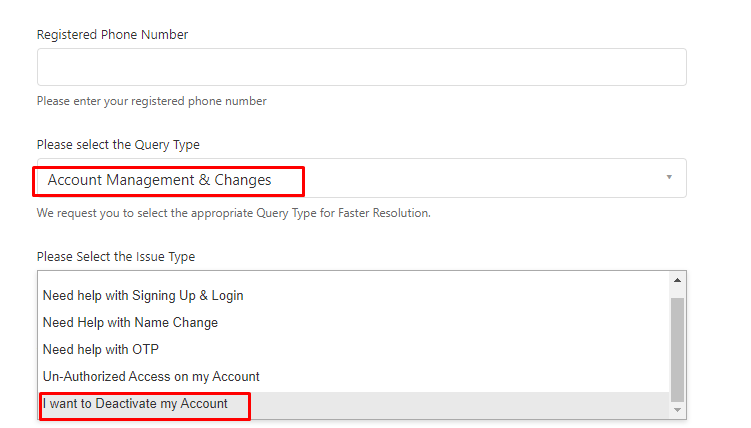
- There, you will have to select ‘Account Management & Changes’ into the Query Type.
- Once done, select ‘I want to Deaactive my Account’ into the Issue Type as shown in the above picture.
- Now, provide all the necessary information and click on the Submit button.
- That’s it.
Note: Before you delete or deactivate your CoinDCX account, make sure to withdraw or your remaining balance from your account. Besides deactivating your CoinDCX account, the platform also provides an option to hold your cryptocurrency exchange trading or stop investing in it for a limited period of time.
To know more about CoinDCX, you can visit its official site.