Close Menu
    Facebook X (Twitter) Instagram
    • About Us
    • Contact Us
    • Privacy Policy
    • Disclaimer
    Facebook X (Twitter) Instagram Pinterest Vimeo
    Games Adda
    • Gaming
    • Tips and Tricks
    • Tech
    • Best Buy
      • Gaming Mouse
      • Headphones
      • Laptops
      • Smartphones
      • Smartwatches
    Subscribe
    Games Adda
    Home » Gaming » Delete PUBG New State Account
    Gaming

    How To Delete PUBG New State Account Permanently?

    Omair IqbalBy Omair IqbalNovember 15, 2021No Comments2 Mins Read
    Share Facebook Twitter Pinterest LinkedIn Tumblr Reddit Telegram Email
    Delete PUBG New State Account
    Share
    Facebook Twitter LinkedIn Pinterest Email

    The much-awaited Krafton’s title ‘PUBG New State’ has been released for Android and iOS devices on November 11th, 2021. In the first 48-hours, the game has been downloaded by more than 10 million users across the globe. There is no denying that the graphics, gameplay, and features of PUBG New State are way better than Battlegrounds Mobile India and PUBG Mobile Global version but a lot of fans want to delete their account for numerous reasons.

    If you too want to delete your PUBG New State account and don’t know how to do it then look no further as we have got you covered. Notably, uninstalling PUBG New State from your Mobile would not get your account deleted. When you do so, your progress will be retrieved when you log in to the game again.

    If you really want to delete your PUBG New State account permanently then you will have to follow a few simple steps.

    Without any further ado, let’s get started:

    Steps To Delete PUBG New State Account Permanently

    Before we explain the entire process, let me tell you that doing this will remove everything such as skins, outfits, and in-game currency from your PUBG New State account.

    If you still are hell-bent on deleting or removing your PUBG New State account permanently then follow the below-mentioned steps:

    • Launch the game on your phone.
    • Login to the account that you want to be deleted.
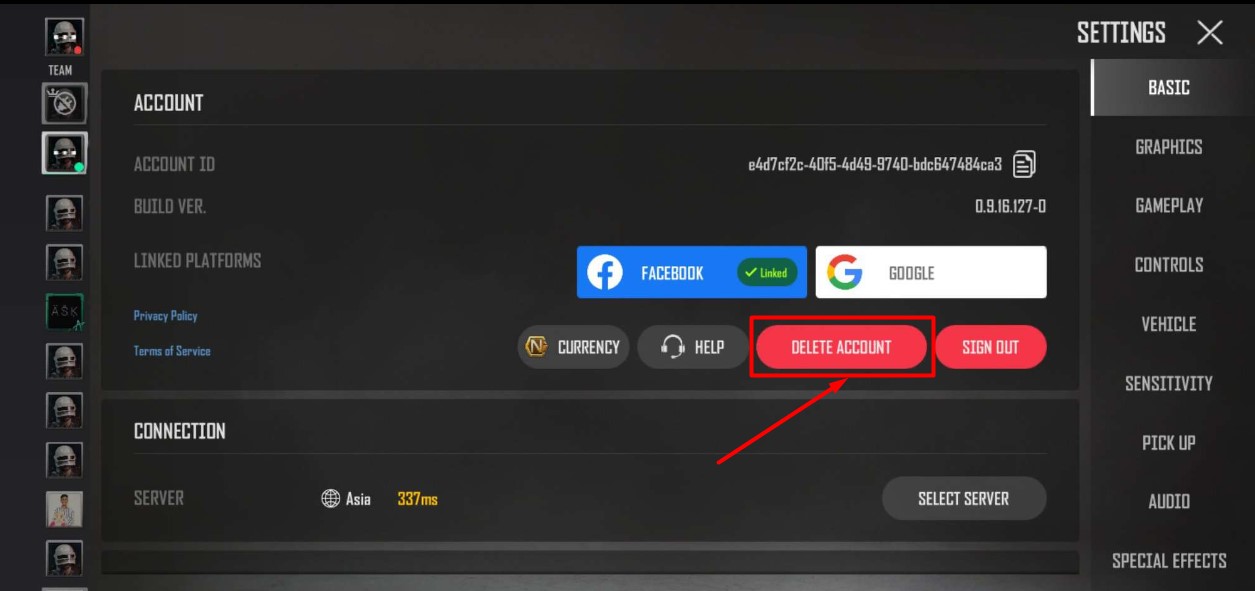
    • Go to the Settings option.

    PUBG New State Delete Account

    • Tap on the ‘Delete Account’ option.
    • When you do so, a new pop-up will appear on the screen asking you to confirm your action.
    • Tap on the ‘Delete Account’ option to confirm the action.
    • That’s it.

    That’s all you need to know about how to delete your PUBG New State account permanently.

    Mobile Games PUBG New State Guides Tips and Tricks
    Share. Facebook Twitter Pinterest LinkedIn Tumblr Email
    Previous ArticleBloxland.com (July 2022): Everything You Need To Know
    Next Article MIR4 Leveling Guide: How To Level Up Faster In MIR4?
    Omair Iqbal
    • X (Twitter)

    Related Posts

    Gaming

    From Lockdown Epiphany to India’s First “Phygital” Arcade: The Claw King Story

    August 19, 2025
    Gaming

    The Biggest Esports Tournaments to Watch in 2025

    March 25, 2025
    Gaming

    Experience Elden Ring Like Never Before: Ranni Demigod Backpack Mod

    July 10, 2024
    Add A Comment

    Comments are closed.

    Facebook X (Twitter) Instagram Pinterest
    • About Us
    • Contact Us
    • Privacy Policy
    • Disclaimer
    © 2026 ThemeSphere. Designed by ThemeSphere.

    Type above and press Enter to search. Press Esc to cancel.