
First Class Trouble is the latest party game released on Steam where players will have to work together to survive a disaster. In order to create a concrete strategy, players will surely need a voice chat option to have a chat with their fellow players. Unfortunately, a lot of players are currently having voice chat not working issues in First Class Trouble and if that’s you then look no further as we have you covered.
Since the game has just been launched on Steam, plenty of players are having multiple issues while playing First Class Trouble (FCT) but what irritated players the most is First Class Trouble voice chat not working or FCT voice chat not in local channel issues.
Also Read | First Class Trouble: Does It Support Crossplay?
If you too are having the same issues while playing FCT then look no further as we have got you covered.
How To Fix First Class Trouble Voice Chat Not Working Issue?
There could be many reasons why players across the world are currently experiencing problems connecting to voice chat in First Class Trouble. If anything to go by the developer’s comment, the First Class Trouble voice chat not working issue is happening because of your unsynced clock.
Also Read | How To Kill In First Class Trouble?
If you are facing FCT voice chat not in local channel issue while playing the game then follow the below-mentioned steps:
- Open Settings.
- Click on Time & Language.
- Click on Date & Time.
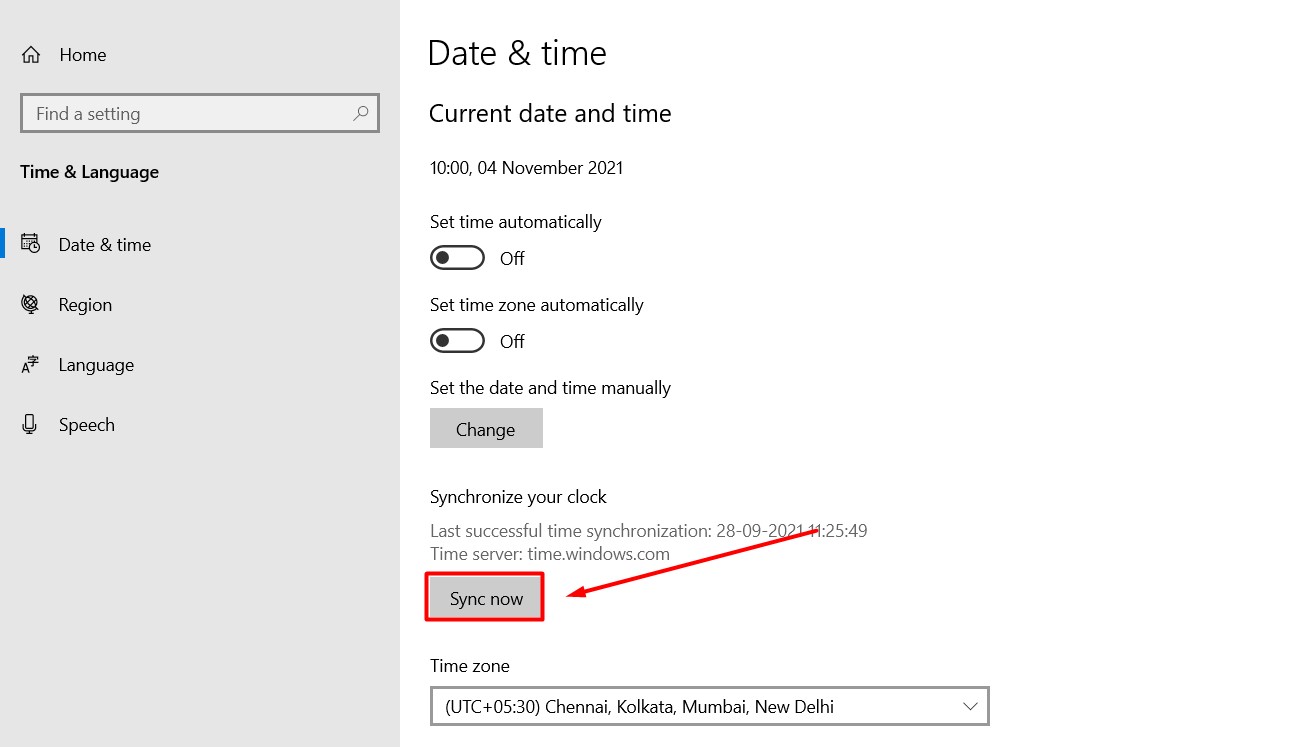
- Under ‘Synchronize your clock’, click on the Sync now button.
If the above-mentioned method does not work for you then you will need to set your speaker and mic as default devices and default communication devices.
If you are still facing the same issue then you must restart your PC or set the folder containing ♥♥♥ as an *exception *for your Firewall/VPN/AntiVirus.
That’s everything you need to know about how to fix the ‘First Class Trouble voice chat not working’ issue right now.