
Are you having an unexpected error in Slime Isekai Memories? If your answer is YES and wants to resolve it right now then you are in the perfect place. Before we teach you how to fix the Slime Isekai Memories error, let me tell you that you are not alone, who is facing this error. Yes, this error is nothing to do with your internet connection or device because it is happening from the developer’s end.
Also Read | Slime Isekai Memories: How To Reroll For Protection & Battle Characters
There are tons of users who have been enjoying the game on their Android and iOS devices but some have to face crashing issues whenever they summon a new character. If you too are having a crashing issue or unexpected errors while playing the game then look no further as we have got you covered.
How To Fix Slime Isekai Memories Error?
The best thing is that the developers are aware of the unexpected errors that Slime Isekai Memories players are having at the moment. Taking to Twitter, they put a post informing fans that they know that a lot of fans are having issues that say ‘Unexpected Error. Now returning to the title screen’.
https://twitter.com/SlimeIsekaiMemo/status/1453650099750506503
In the same Tweet, they stated that they are currently busy fixing this issue. As soon as they fix the issue they will inform about the same on Twitter.
If you can’t wait to play the game and looking for a possible solution to fix this issue right away then you will have to follow these simple steps:
To fix Slime Isekai Memories unexpected error, you will have to tap on the Menu option located on the title screen. When you do so, a bunch of options will appear on the screen.
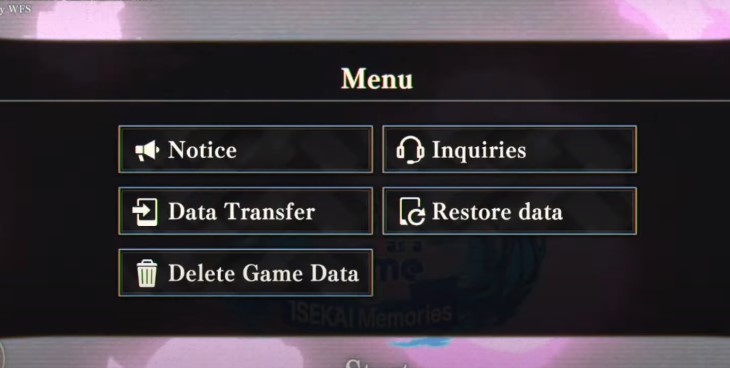
Tap on the ‘Delete Game Data’ option and select ‘YES’ to proceed. When you do so, you will be asked to confirm the process. If you really want to fix this issue, tap on ‘YES’. Once the data is deleted, you will have to start the game from the beginning.
Note: Make sure you bind your account before you apply the above-mentioned fix. If you did not bind your account, the game will start from fresh and you would lose your progress.
How To Bind Your Account Slime Isekai Memories?
It is pretty simple to bind your account in Slime Isekai Memories. However, if you don’t know it is done then follow the below-mentioned steps:
- Launch the game
- Tap on the Menu option to open up the main menu
- Tap on ‘Data Transfer Option’.
- Go to ‘Data Transfer Settings’.
- Enter your data transfer password and tap on the ‘YES’ button.
- Once done, now you to open the game on either PC or Mobile and go to the title screen
- Tap on the Menu option and then ‘Data Transfer’.
- Enter your Data Transfer ID and Password.
- That’s it.
That’s all you need to know about how to fix the unexpected errors and how to bind your account in Slime Isekai Memories.