
Do you want to know how to turn off the mic or microphone in Valorant? If your answer is YES, then we have you covered. There is no doubt that playing Valorant with your friends is super fun while talking to them but if you do not want to do that and want to disable your voice chat or mute yourself in Valorant then here is a step by step guide for you.
Without any further ado, let’s get straight to the step-by-step guide to turn the mic off in Valorant.
How To Turn Microphone Off In Valorant?
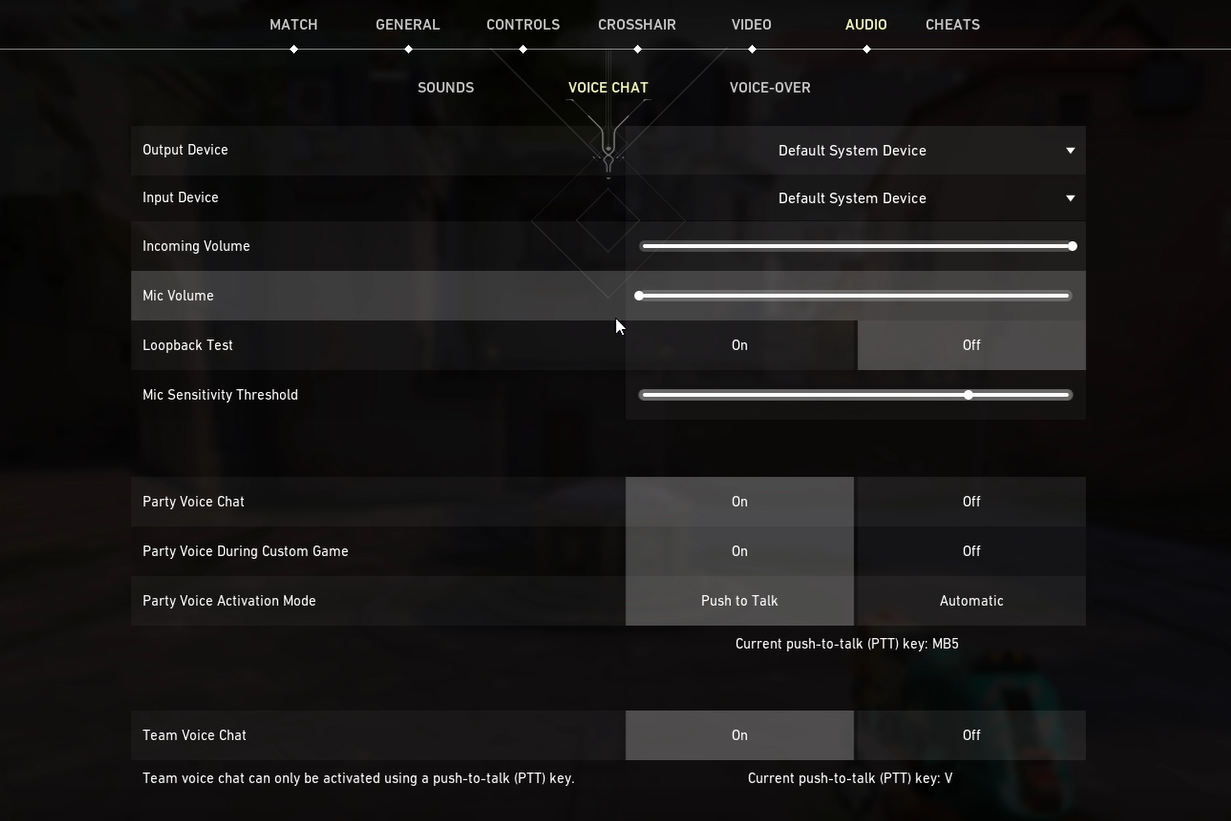
Here are all the steps to turn the mic off or disable voice chat in Valorant. Follow the steps to mute yourself in the game.
1) Launch Valorant on your device.
2) Press the ‘ESC’ button on your keyboard to open ‘SETTINGS’ in the game.
3) Here you will find many tabs aligned in a horizontal line on the top of the screen.
4) Click on ‘Audio’ to change the microphone settings. And then go to ‘Voice Chat’ from the three submenus in front of you.
5) Do the following changes in your Audio settings to disable voice chat or to turn the mic off in Valorant.
- Mic Volume- Kepp t to the lowest by dragging the pointer to your left.
- Loopback test- off
- Mic Sensitivity Threshold- Keep the lowest
- Party Voice chat – on
- Party Voice During Custome Game- Off
- Party Voice Activation Mode- Push to Talk
6) Make these changes from your settings to successfully mute yourself or to disable voice chat in Valorant.
Are There Any Other Ways To Turn The Mic Off In Valorant?
If you are still here and looking for an easier way to turn the mic off then here is a solution for you. Check your headphones properly and see if there is a dedicated button for the microphone. If your headset has a button to turn the microphone on and off then you can turn the mic off by pressing the button.
That’s it for this one, check out another article to know what is raw input buffer is in Valorant.