
Close Menu
    Facebook X (Twitter) Instagram
    • About Us
    • Contact Us
    • Privacy Policy
    • Disclaimer
    Facebook X (Twitter) Instagram Pinterest Vimeo
    Games Adda
    • Gaming
    • Tips and Tricks
    • Tech
    • Best Buy
      • Gaming Mouse
      • Headphones
      • Laptops
      • Smartphones
      • Smartwatches
    Subscribe
    Games Adda
    Home » Gaming » How To Fix Apex Legends Anti-Cheat Error In 2022?
    Gaming

    How To Fix Apex Legends Anti-Cheat Error In 2022?

    Chinmayee HBy Chinmayee HDecember 31, 2021Updated:December 31, 2021No Comments2 Mins Read
    Share Facebook Twitter Pinterest LinkedIn Tumblr Reddit Telegram Email
    Apex Legends anti cheat error fix
    Share
    Facebook Twitter LinkedIn Pinterest Email

    Are you facing an Anti-Cheat Error in Apex Legends on your Steam account? Anti-Cheat Error (ACE) usually occurs due to outdated windows or some issues in the system drivers. But it isn’t a big deal you can fix it by following some steps through your Steam account. Here is a complete guide to help you fix Apex Legends Anti-Cheat Error.

    Also Read | How To Fix Steam Easy Anti-Cheat & EAC Index Not Found Error?

    Guide To Fix Anti-Cheat Error In Apex Legends:

    If you ever come across a message saying “The client is not running the anti-cheat or has failed the anti-cheat authentication” when you try to access Apex Legends on Steam then follow the steps written in the article below to fix it.

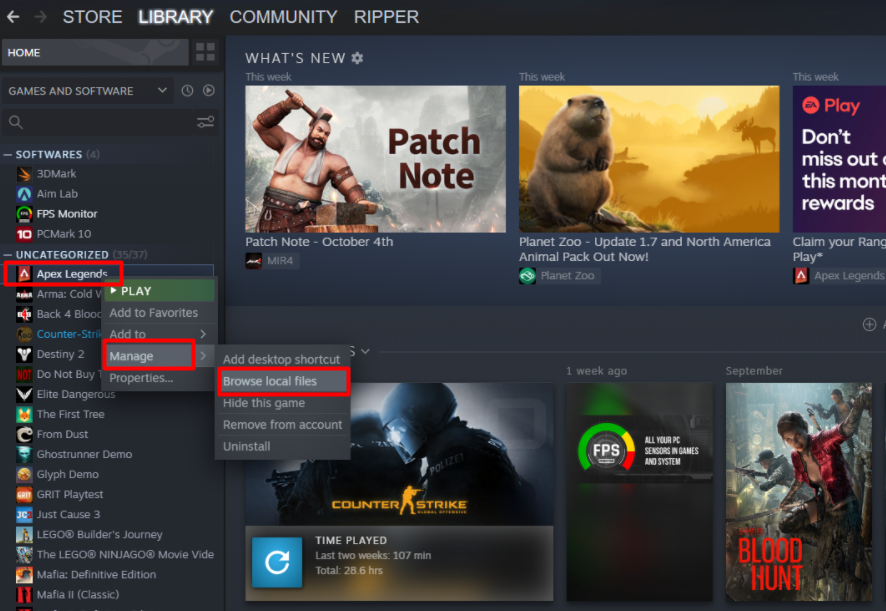
    1) Open your Steam account on your PC and search for Apex Legends in the left side menu in the Library.

    2) Now right-click on Apex Legends and then click on Manage from the list of options. One more small list will appear, then click on the Browse local files as shown in the image below. (Right-click on Apex Legends >> Manage >> Browse local files)
    Apex Legends anti cheat error fix

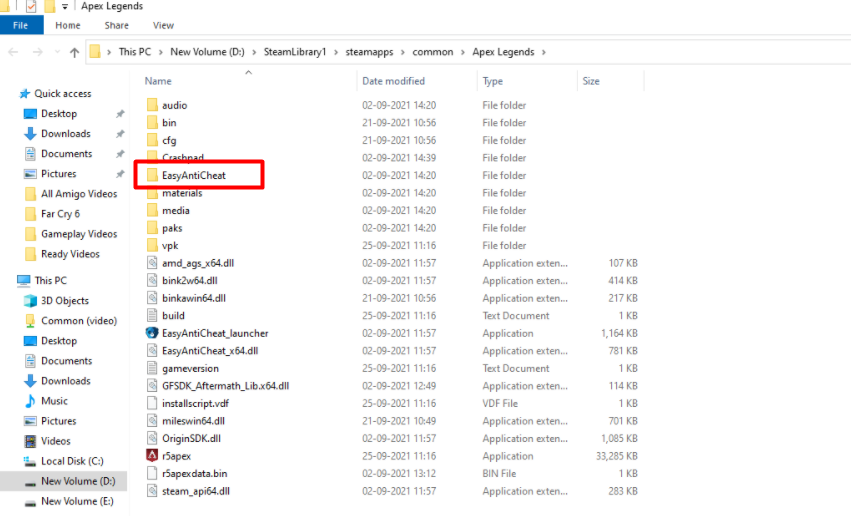
    3) A new window will appear in front of you with several files in the game. Search for the “EasyAntiCheat” folder and double-click on it to open it.
    Apex Legends anti cheat error fix

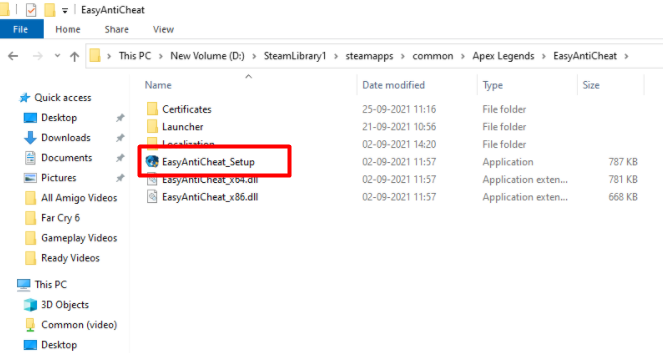
    4) Next click on “EasyAntiCheat_Setup” to open the folder. Now, you will have to double click on EasyAntiCheat_setup, which is an in-built program in Steam that helps you to quickly reinstall the game and fix the anti-cheat error if there is any.
    Apex Legends anti cheat error fix

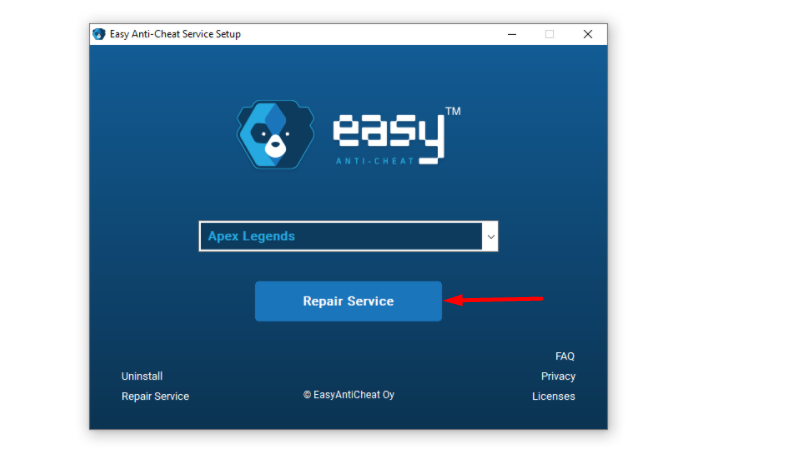
    5) A new window will pop up on your screen. Click on the ‘Repair Service’ button to fix the anti-cheat error.
    Apex Legends anti cheat error fix

    6) Apex Legends will reinstall now on its own. Once it’s done, click on the ‘Finish’ button and then close the window. Launch Apex Legends now and try logging in again the error should be fixed!
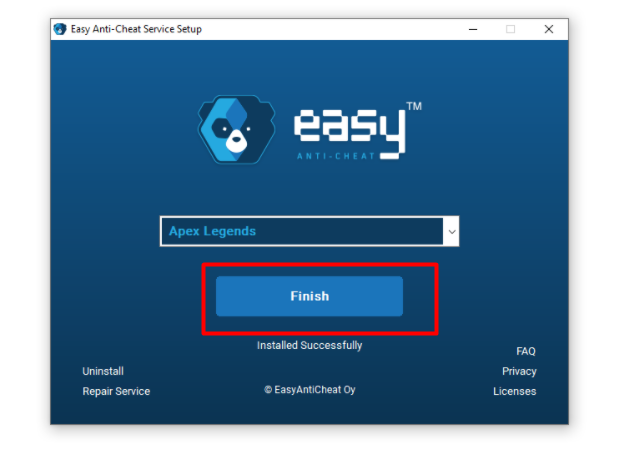
    Apex Legends anti cheat error fix

    This is everything you need to know about how to fix anti-cheat errors in Apex Legends. Check out another article on how to fix New World Steam must be running to play this game error.

    Apex Legends Apex Legends Guides PC Games Steam
    Share. Facebook Twitter Pinterest LinkedIn Tumblr Email
    Previous ArticleHow To Fix Steam Easy Anti-Cheat & EAC Index Not Found Error In 2022?
    Next Article Former CS: GO Player MaiNLiNE Passes Away At 26
    Chinmayee H

    Workrate so good you can call me Kante!

    Related Posts

    Gaming

    From Lockdown Epiphany to India’s First “Phygital” Arcade: The Claw King Story

    August 19, 2025
    Gaming

    The Biggest Esports Tournaments to Watch in 2025

    March 25, 2025
    Gaming

    Experience Elden Ring Like Never Before: Ranni Demigod Backpack Mod

    July 10, 2024
    Add A Comment

    Comments are closed.

    Facebook X (Twitter) Instagram Pinterest
    • About Us
    • Contact Us
    • Privacy Policy
    • Disclaimer
    © 2026 ThemeSphere. Designed by ThemeSphere.

    Type above and press Enter to search. Press Esc to cancel.