
Are you having Tinder error 80500? If your answer is YES and you are looking for ways to fix this frustrating error then don’t worry, we have got you covered. There are tons of Tinder users who have been complaining to face error code 80500 when they launch the application on their device. The majority of people who are facing error code 80500 on Tinder are iOS users.
Since the developer of the Tinder app is yet to make an official announcement regarding the same, we have discovered a bunch of ways that could fix Tinder error 80500 in 2022. Want to fix this error as soon as possible? Keep reading this post.
How To Fix Tinder Error 80500 in 2022?
Before we teach you how to fix error 80500 on Tinder, let me tell you that it is not happening from the user’s end. Yes, this error represents a server outage. Whenever a user is opening the Tinder application on their phone, he or she is greeted with an error message that says “Something went wrong. Please try again later. A:80500.”
If you too are having the same issue then follow the below-mentioned methods to fix error 80500 on Tinder:
Check Server Status
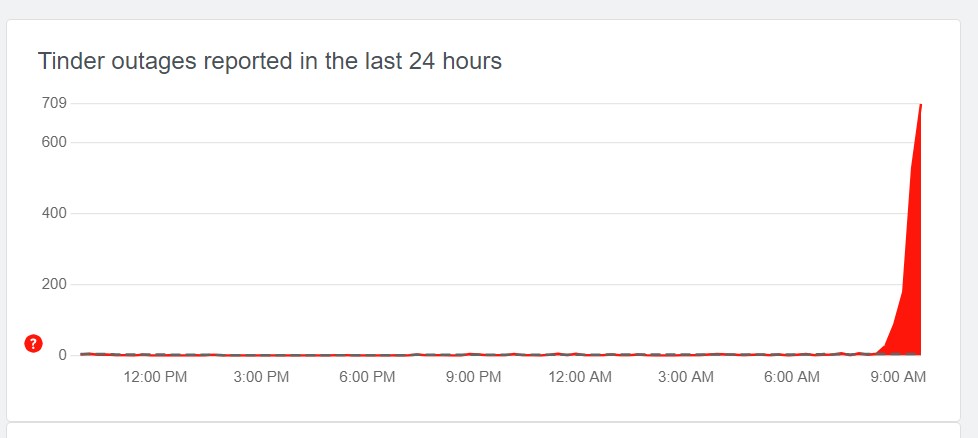
To check the server status of Tinder, you will have to either visit its official social media handles or visit a website called ‘Downdetector’. When you visit the site, you will be shown the number of users is complaining about the application. If you take a look at the above picture, Notably, Downdetector only highlights issues when the number of reports is way higher than the typical number.
Since the error 805000 that Tinder users are currently having is happening because of server usage, you have no option but to wait until the server is back again. If the server is UP and you are still facing the same issue then you will have to follow the below-mentioned troubleshooting steps:
Check Your Internet Connection
Sometimes users also encounter error code 80500 on Tinder when they have a poor internet connection. So, make sure you have a reliable internet connection while using the app.
Update Your Tinder
When your application is not up to date, you are bound to face errors not only on Tinder but on all applications you use on your phone. Before you update your Tinder application via Google Play Store and Apple App Store, I strictly advise you to clear your app data and cache by going to the Settings option.
Once both data and cache are cleared, go to Play Store and App Store and update your Tinder application. Once updated, launch it to see if the error remains.
Reinstall & Restart Tinder
If the above-mentioned methods did not work for you then you have no option but to uninstall the Tinder application. Once uninstalled, restart your device and install the Tinder application again. Once installed, run the application on your phone to check if the issue continues to pop up.
If none of the methods helped you to fix the Tinder 80500 error, you will have to wait until the server is up again. Once the server is up, you would not face any issues while using the Tinder application.