
Close Menu
    Facebook X (Twitter) Instagram
    • About Us
    • Contact Us
    • Privacy Policy
    • Disclaimer
    Facebook X (Twitter) Instagram Pinterest Vimeo
    Games Adda
    • Gaming
    • Tips and Tricks
    • Tech
    • Best Buy
      • Gaming Mouse
      • Headphones
      • Laptops
      • Smartphones
      • Smartwatches
    Subscribe
    Games Adda
    Home » Valorant » How To Fix “Valorant Is Not Available On Your Operating System” Error?
    Gaming

    How To Fix “Valorant Is Not Available On Your Operating System” Error?

    Chinmayee HBy Chinmayee HSeptember 23, 2021Updated:September 23, 2021No Comments2 Mins Read
    Share Facebook Twitter Pinterest LinkedIn Tumblr Reddit Telegram Email
    this game is not available on your operating system" error
    Share
    Facebook Twitter LinkedIn Pinterest Email

    Are you also facing the “this game is not available on your operating system” error when you try to open Valorant? If yes then don’t worry, you are not alone. There are plenty of Valorant players who have recently been encountering this error and if you are here to find a solution to the “Valorant is not available on your operating system” error then you have come to the right place.

    Valorant: How To Fix “This Game Is Not Available On Your Operating System” Error?

    this game is not available on your operating system" error

    There are tons of Valorant players who have been complaining that they face an error whenever they attempt to launch Valorant on their PC. Due to this error, their play button turns grey when they click on it and get an error message that says “this game is not available on your operating system”.

    If you too want to fix this frustrating Valorant error then follow the below-mentioned steps:

    1) Close Valorant from task manager on your computer.

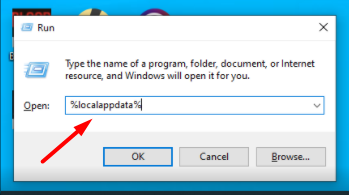
    2) Open the run command section by pressing the “Windows key + R” on your keyboard.

    3) One small text box will appear on your screen. Type “%localappdata%” in the text box. The code is case sensitive so make sure you type it as it is given here.
    this game is not available on your operating system" error

    4) Hit the Enter key on your keyboard or click on the Ok button to run the command.

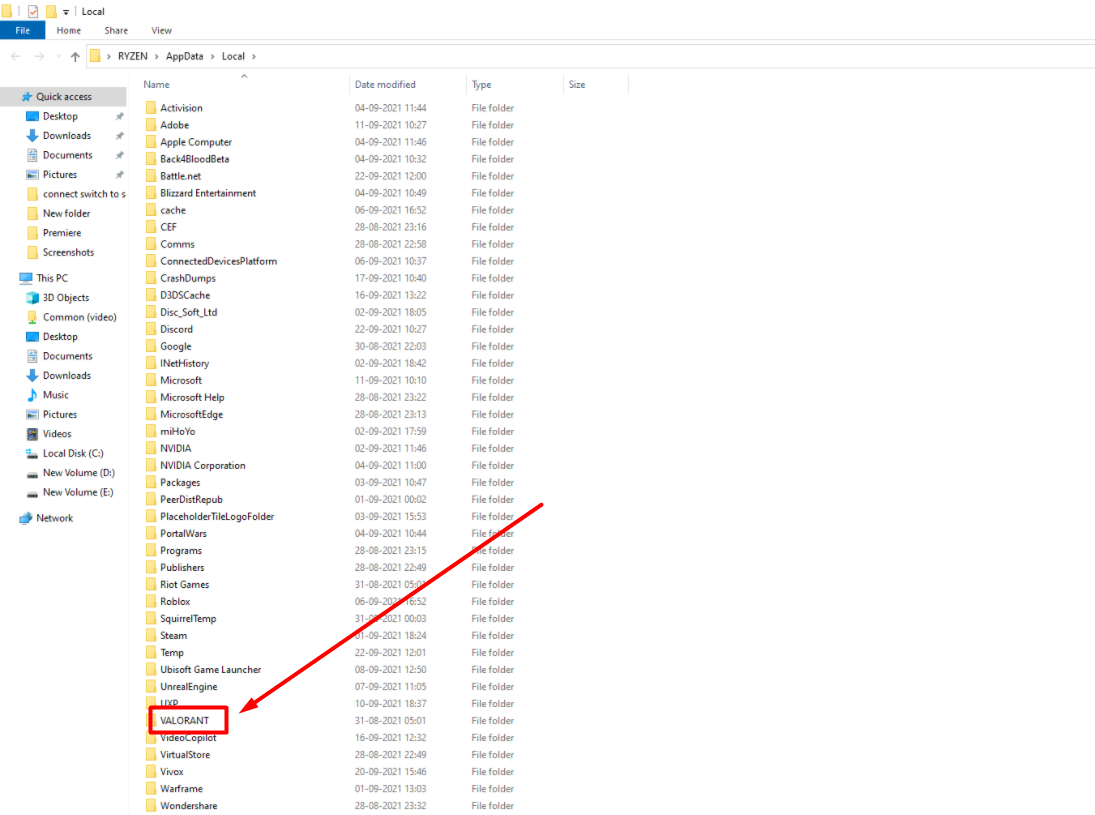
    5) Now a long list of all the apps on your computer will appear in front of you. Find the Valorant folder from the list. Open the folder by clicking on it.
    this game is not available on your operating system" error

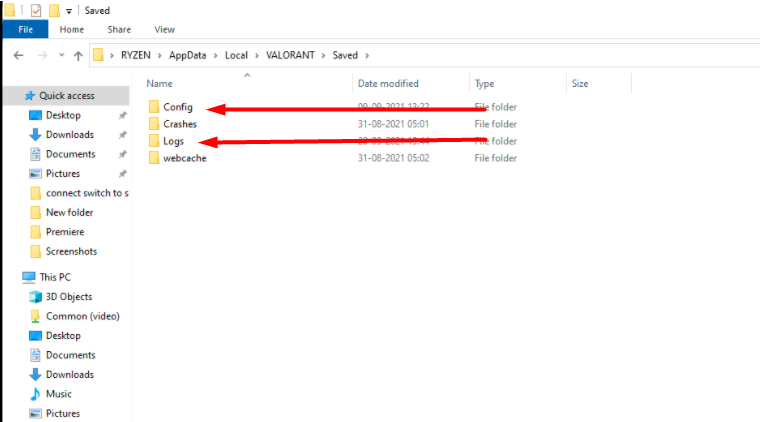
    6) A new list will appear with few folders in Valorant. Delete Config and Log Folder from the list by selecting it one by one.
    this game is not available on your operating system" error

    7) Now close the Run Command window and restart your computer.

    8) Now try opening Valorant again on your PC and see if the error “this game is not available on your operating system” remains.

    This is everything you need to know about how to fix the “this game is not available on your operating system” error in Valorant. Check another article on how to fix error code 138 on Valorant.

    Valorant Valorant Guides
    Share. Facebook Twitter Pinterest LinkedIn Tumblr Email
    Previous ArticleGenshin Impact Bennett Artifact & Best Weapons (November 2022)
    Next Article Ipointsr.com 2022: How To Get Unlimited Free Fire Diamonds & Coins?
    Chinmayee H

    Workrate so good you can call me Kante!

    Related Posts

    Gaming

    From Lockdown Epiphany to India’s First “Phygital” Arcade: The Claw King Story

    August 19, 2025
    Gaming

    The Biggest Esports Tournaments to Watch in 2025

    March 25, 2025
    Gaming

    Experience Elden Ring Like Never Before: Ranni Demigod Backpack Mod

    July 10, 2024
    Add A Comment

    Comments are closed.

    Facebook X (Twitter) Instagram Pinterest
    • About Us
    • Contact Us
    • Privacy Policy
    • Disclaimer
    © 2026 ThemeSphere. Designed by ThemeSphere.

    Type above and press Enter to search. Press Esc to cancel.