
Close Menu
    Facebook X (Twitter) Instagram
    • About Us
    • Contact Us
    • Privacy Policy
    • Disclaimer
    Facebook X (Twitter) Instagram Pinterest Vimeo
    Games Adda
    • Gaming
    • Tips and Tricks
    • Tech
    • Best Buy
      • Gaming Mouse
      • Headphones
      • Laptops
      • Smartphones
      • Smartwatches
    Subscribe
    Games Adda
    Home » Gaming » Splitgate 1V1 Mode Guide
    Gaming

    Can You Play 1V1 In Splitgate?

    Chinmayee HBy Chinmayee HAugust 11, 2021No Comments2 Mins Read
    Share Facebook Twitter Pinterest LinkedIn Tumblr Reddit Telegram Email
    Splitgate 1V1 Mode Guide
    Share
    Facebook Twitter LinkedIn Pinterest Email

    The Beta version of Splitgate is out and all the gamers are loving it for its Halo meet portal theme. Now if you are wondering can you play 1v1 in Splitgate and enjoy this match with your friend in a due then we have got all the solutions for you. So the answer for it is YES! yes you can just customize settings and play 1v1 in Splitgate.

    Splitgate has many modes to play like 4v4, 3v3, etc. In order to unlock different modes, you have to follow the Ranking system. The Splitgate works on a Ranking system similar to the Counter-Strike: Global Offense (CS: GO). It has Different ranks from Brass to Champion. Go check out these ranks and play in your favorite 1v1, 4v4, or 3v3 mode.

    Splitgate: How To Play 1v1?

    Don’t like to play in a group or want to have one to one match with your friend or enemy? Do not worry we have a guide to take you through it.

    Here are all steps that you will need to follow to play 1V1 in Splitgate:

    1) Launch the game on your console or Pc.

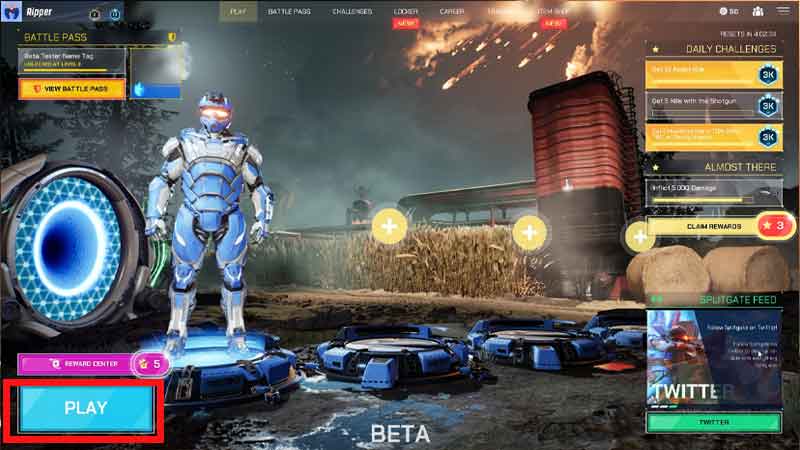
    2) Find the ‘PLAY’ button on the left corner of your screen. Click on it.
    Splitgate

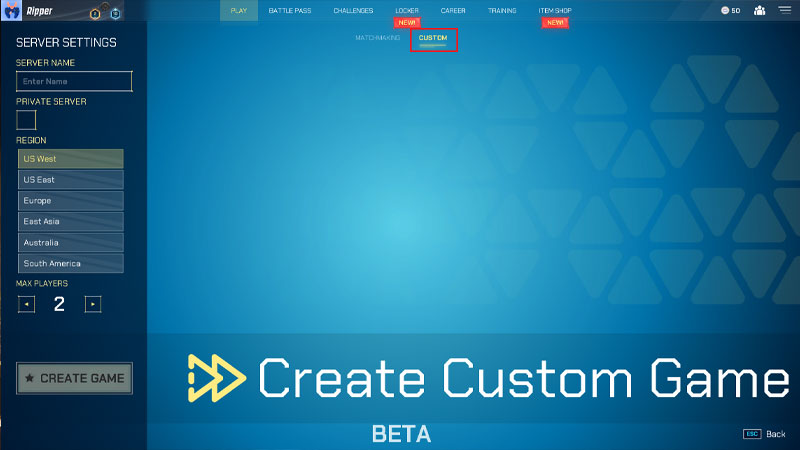
    3) In a new window, click on the ‘CUSTOM’in the center top of the screen.
    Splitgate

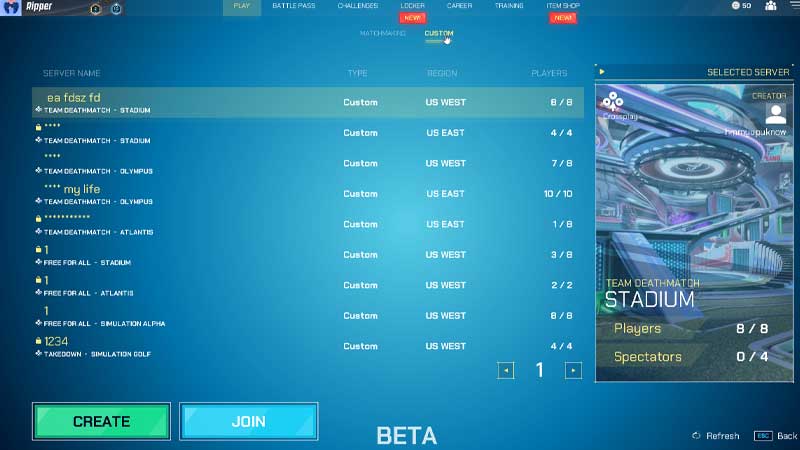
    4) Click on ‘CREATE GAME’ located in the bottom left corner.
    Splitgate

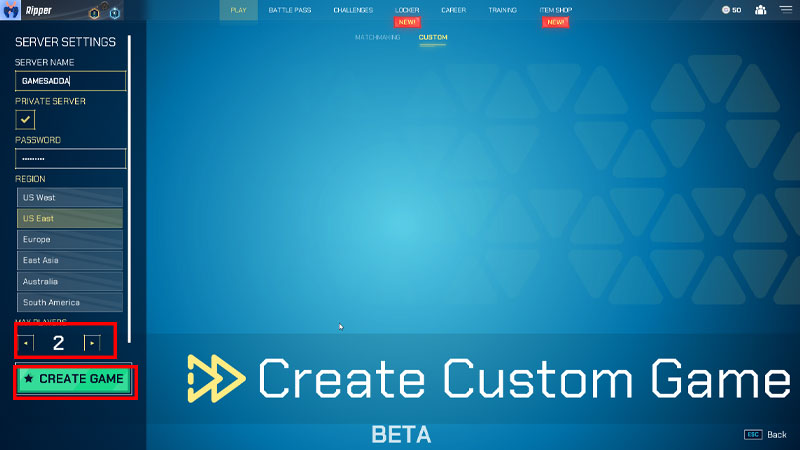
    5) From the side menu, Select max ‘2’ Players.
    Splitgate

    6) Hit the ‘CREATE GAME’button. and it’s set!

    After creating a game either select any one of the players from your friend’s list. Or click on ‘Invite Players’ to start the match.

    That’s everything about how to play 1v1 in Splitgate. Gamesadda also covers all the latest updates in Splitgate. So if you are stuck at any point in Splitgate. Check out our website and get solutions for it. To know more about Ranking System in Splitgate check our article on it.

    Splitgate Guides Tips and Tricks
    Share. Facebook Twitter Pinterest LinkedIn Tumblr Email
    Previous ArticleDragon Ball Z Dokkan Space Travelling Warriors Tier List (January 2023)
    Next Article Can We Download BGMI IOS Version From Decidenet.in?
    Chinmayee H

    Workrate so good you can call me Kante!

    Related Posts

    Gaming

    From Lockdown Epiphany to India’s First “Phygital” Arcade: The Claw King Story

    August 19, 2025
    Gaming

    The Biggest Esports Tournaments to Watch in 2025

    March 25, 2025
    Gaming

    Experience Elden Ring Like Never Before: Ranni Demigod Backpack Mod

    July 10, 2024
    Add A Comment

    Comments are closed.

    Facebook X (Twitter) Instagram Pinterest
    • About Us
    • Contact Us
    • Privacy Policy
    • Disclaimer
    © 2026 ThemeSphere. Designed by ThemeSphere.

    Type above and press Enter to search. Press Esc to cancel.