
There are plenty of online games available on the internet but none of them is error-free. The error players are currently having in New World is a connection failed, which is a quite common error in an online game.
New World connection failed error is restricting players to connect to a server, leaving thousands of players frustrated and angry. There are plenty of players who have been having this issue are currently searching for ways to fix this issue and if that’s you then look no further as we have got you covered.
How To Fix New World Connection Issues?
Connection issues in an online game occur because of two reasons — user-side issues and ISPs. Those who are encountering New World Connection Failed issue must follow the steps mentioned below to fix it.
- First, Restart your PC and unplug the wire from the Modem and Router for a while.
- Plug the wire of your Modem and Router and wait until the internet connection is completely restored. Once restored, power your PC and launch the game.
- If possible, make sure to switch from a Wireless connection to a Wired one.
- If the error remains, you have no option but to reset and refresh your PCs connected to the internet.
If you don’t know how it can be done then follow the given steps:
- Click on the Windows button and type ‘CMD’.
- Doing this will show you the Command Prompt window.
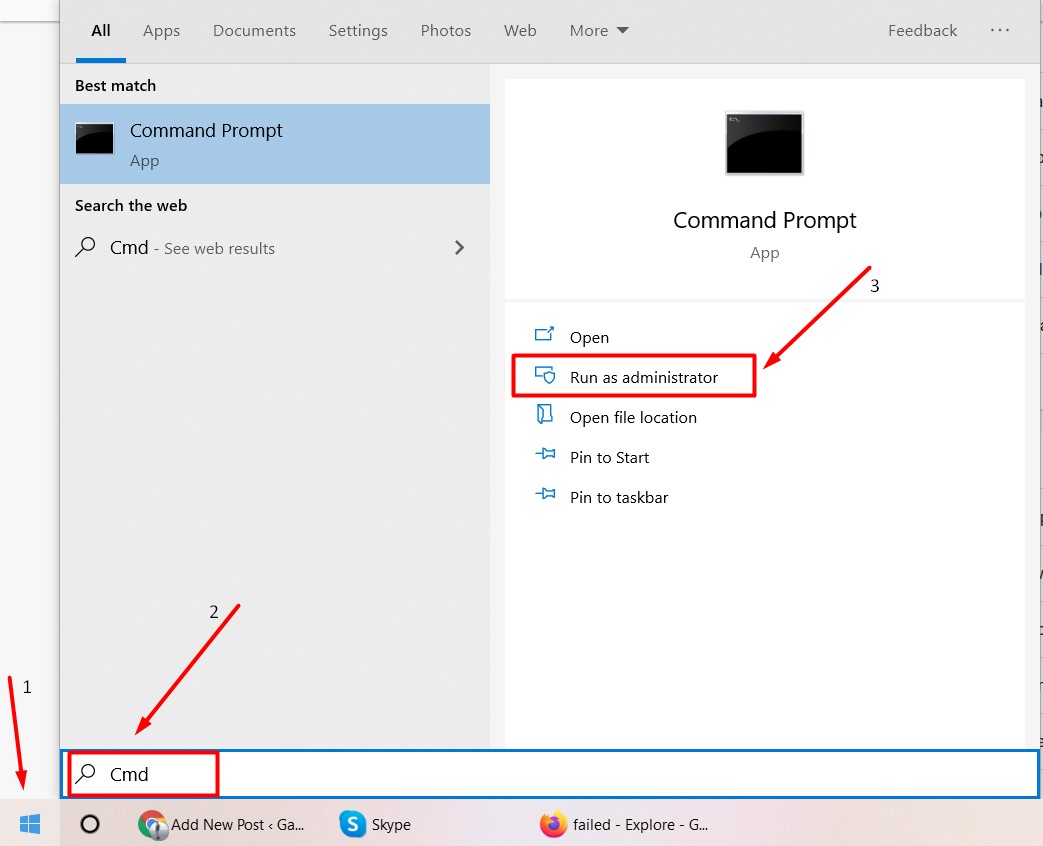
- There, you will have to click on the Run as administrator as shown in the above picture.
Once done, you will have to enter the following commands one by one and hit the Enter button.
- Type ipconfig /flushdns
Type ipconfig /registerdns - Type ipconfig /release
- Type ipconfig /renew
- Type netsh winsock reset
- Restart your PC.
Once you have successfully performed these steps, you would not face the New World connection failed issue again.