
Mobile phones have become one of the most extensively used platforms in the world of gaming. They are the most affordable yet multitasking devices used for various purposes. For all the mobile gamers Realme has come up with the latest addition in their system called ‘Realme Game Space’. It’s an application that helps mobile players to get the best gaming experience on their devices. So if you want to know about this new Realme Game Space and download it on your device then here is a complete guide for you!
What Is Realme Game Space?
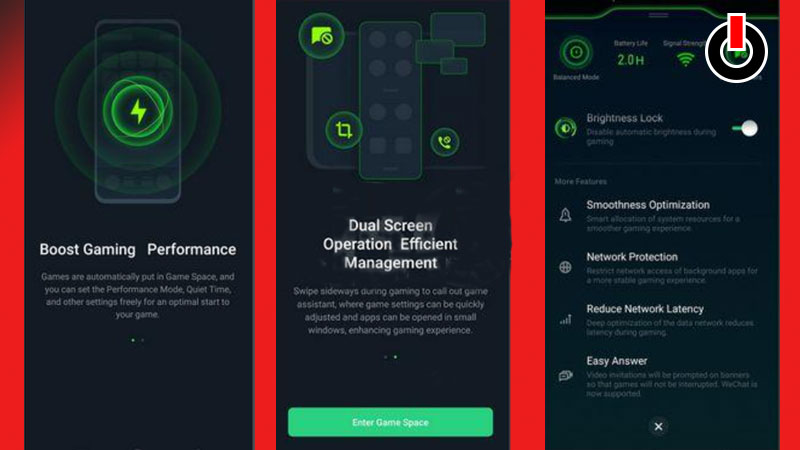
The new Realme Game Space is an application launched in 2022 that will help you get the best gaming experience on all your Realme and Oppo devices. It is available to download for free for android versions 10, 11, and above on all Realme devices. It is an amazing update for all the players as it detects all the games that are installed on your device and makes them available for you on a single platform. Even if the app fails to recognize any of the game that is installed on your device it gives you an option from where you can add or remove your favorite games and enjoy them at their best!
Features:
Here is a list of all the different features that Realme Game Space has to offer.
- Voice Changer Mechanism
- Screen recording
- Block all class and messages popping on your screen while playing
- Boost Gaming Performance
- Reduce Network Latency
- Smooth Optimization
- Better Graphics
- Userfriendly
- Comes with a Network Protection
How To Download & Use Realme Game Space?
It is very easy to download Realme Game Space on Realme devices. Follow a few simple steps written in the guide below to get this app on your phone!
- Open any browser on your Realme Device.
- Search for ‘Realme Game Space 2022‘
- Click on any reliable link on the next screen.
- Find and hit the Download button.
- While it’s downloading, head to Settings and turn the ‘Unknown source‘ option ON.
- Open the file and Install it on your device.
- Launch Realme Game Space and enjoy playing all your favorite games in the best graphics, more features, and without any disturbance.
Note- Realme Game Space is dedicated to Realme devices and hence if you try to download it from any other device you might not succeed in the same.