
Pokemon Unite has a fair set of powerful moves that can sweep the opponent off of its feet. The battles can get intense in the heat of the moment and you need to be strong enough to lead your team to victory. While playing this game, you must have heard about the boosted attacks in Pokemon Unite. In this guide, you will learn more about these attacks and how to charge them. All you have to do is simply follow through with this guide till the end.
What are Boosted Attacks in Pokemon Unite?
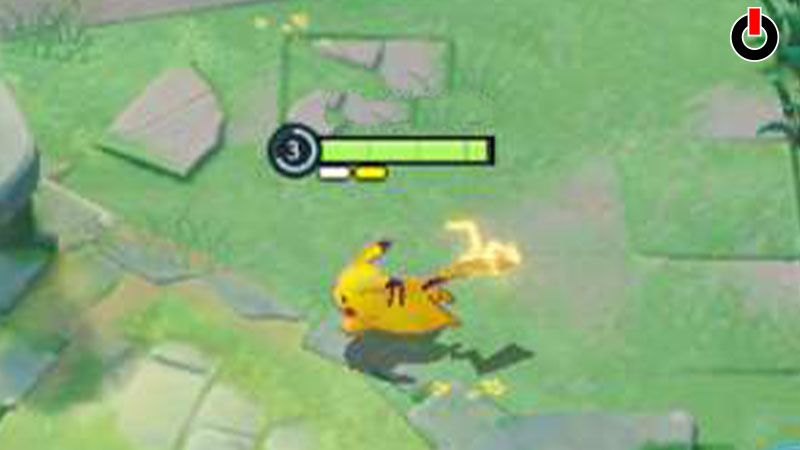
Boosted attacks in Pokemon Unite are the charged version of basic attacks that a player can use in battles. These attacks are more powerful than basic attacks. Each Pokemon has a different rate of summoning this charged attack. In order to use the boosted attacks, you have to first charge your basic attack. You can do this by using your basic attack a few times.
You can see the boosted attack on your screen under the Pokemon’s HP Bar. All you have to do is just have to tweak your game settings a tad. Most of the players are using this feature and know how to toggle it off when it’s not needed.
If you’re new to this game and want to see this feature in action, you’re lucky to have stumbled upon this guide. We have mentioned a few steps below for you to refer to that show how to get this feature up and running.
- Open Pokemon Unite on your device
- On the main screen, click on the Profile icon
- Scroll down on the left side and find the Settings tab
- In the Settings menu, click on the Battle Info tab
- Switch the Boosted Attack Guage to On
Once you do that, you’ll be able to see the Boosted Attack Gauge right below the HP bar of the Pokemon. Usually, you will see one White bar and one Yellow bar. The Yellow bar indicates that the next basic attack will be boosted.
This is all you need to know about boosted attacks in Pokemon Unite. Hopefully, this guide was helpful to you. While you’re here, you can go ahead and check out other similar articles such as List of Move Types and Their usage in Pokemon Unite and How to upgrade Held Items?