
Thetan Arena is a popular free-to-earn game. The game is in limelight since its launch for its amazing gameplay that is combined with cryptocurrency. There are many players out there enjoying this play-to-earn game on Mobile and PC but many are having the ‘Maximum Login Limit’ error while trying to login into the game. If you are also experiencing this issue then we have a solution for you.
Check out the steps written in the guide below to fix the login issue in Thetan Arena.
How To Fix ‘Maximum Login Limit’ Issue In Thetan Arena?
To fix the Maximum Login Limit error in Thetan Arena, you will have to download an application called Sandboxie that creates a separate operating environment for applications without permanently modifying their local system. It is available on the internet for windows and can fix the error that you are facing in the game.
So without wasting any time let us get started with steps to fix the Thetan Arena Maximum Login Limit Error.
1. Open any browser on your PC and search for Sandboxie. Or you can download it by simply clicking on this link.
2. Find the Download button on your screen to download Sandboxie successfully.

3. Now go to the downloads folder and install Sandboxie on your PC.
4. Open the Sandboxie web browser by double-clicking on it.
5. Next is drag and drop/copy-paste Thetan Arena from the desktop or its file location to the Sandboxie.

6. One small window will pop up with a message “Select the Sandbox in which to start the program or document”. Click on the OK button to open Thetan Arena through Sandboxie and fix the Maximum Login Limit Error.
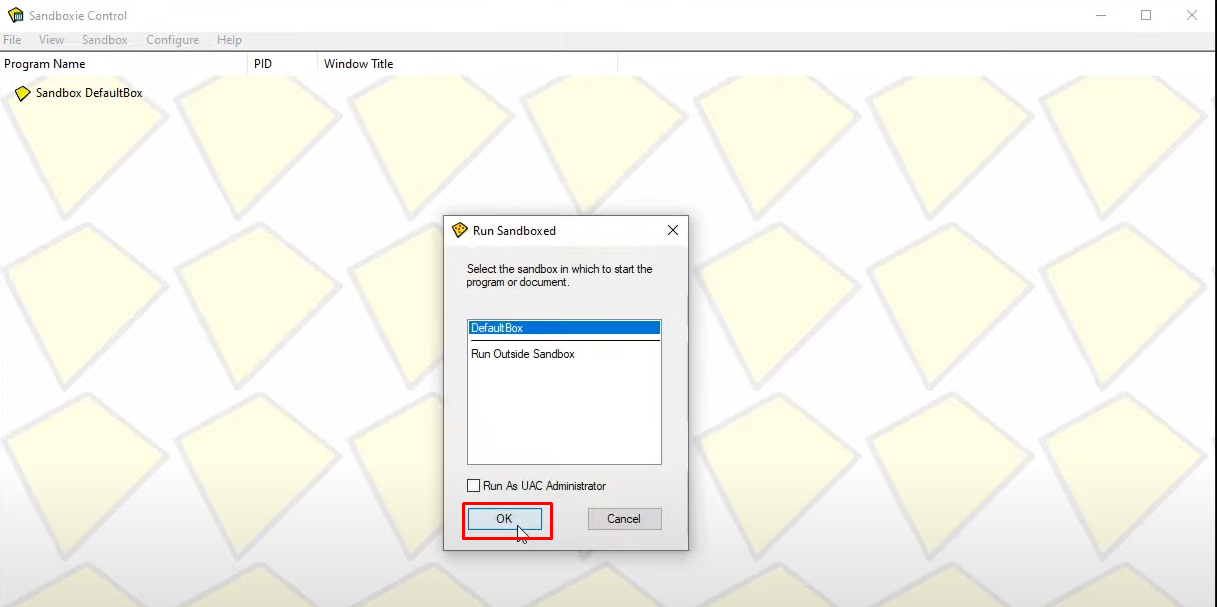
7. The game will launch again, try and login using the same login ID again.
8. You have successfully fixed the Thetan Arena Login issue.
Note: For ease of access create the Thetan Arena shortcut on the desktop so that you can easily drag and drop it rather than looking for its local disks.
That’s all you need to know about how to fix the Maximum Login Limit Error in Thetan Arena. For more such guides on Thetan Arena stick to GamesAdda.in.