
Almost a year after making an announcement to launch The Witcher: Monster Slayer for Android and iOS devices, the publisher of the game has finally started pre-registration for the game on the Google Play Store and Apple’s App Store.
Ever since the pre-registration for the free-to-play augmented reality (AR) role-playing game started, there are thousands of fans who have successfully pre-registered the game.
Those who have pre-registered for the game will get exclusive in-game rewards for free.
Have you pre-registered for The Witcher: Monster Slayer? If your answer is NO then you are at the right place. In this post, we will teach you how to pre-register and download the Witcher Monster Slayer.
The Witcher: Monster Slayer Release Date
Spokko — the publisher of the game — had recently released a statement in which they clearly mentioned that The Witcher: Monster Slayer will launch for Android and iOS on July 21st, 2021.
They also mentioned that this game is quite similar to Pokemon Go but it will have numerous characters and creatures from the Witcher Universe. Fans will get to play as new witchers and experience location-based gameplay wherein they will have to face numerous monsters across the world of the Witcher Universe.
How To Pre-Register For Witcher: Monster Slayer?
The process of pre-registration for The Witcher: Monster Slayer is pretty simple. The best thing about this game is it does not require you to fill a long-form.
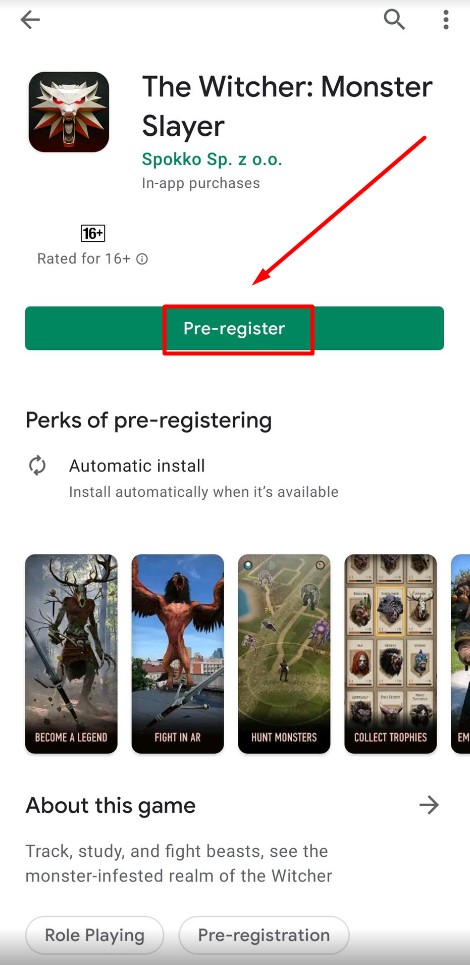
To pre-register for The Witcher: Monster Slayer, you simply need to open Google Play Store and search for the game. When you do so, the game will appear on the screen with the option “Pre-Register.”
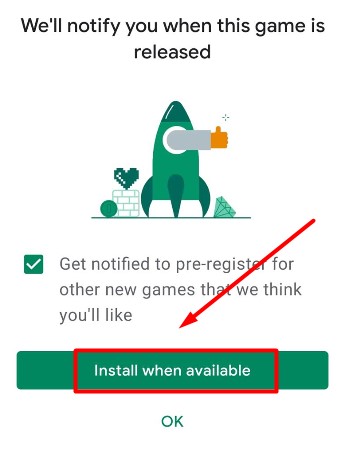
You simply need to tap on the ‘Pre-Register’ option. When you do so, a pop-up window will appear on the screen that says, “We’ll notify you when this game is released.”
You simply need to tap on the OK button and the game will automatically be installed on your device when it becomes available on Google Play Store.
How To Download The Witcher: Monster Slayer On Android?
Downloading The Witcher Monster Slayer on Android is straightforward. If you don’t know the process then follow the steps mentioned below.
- Launch Google Play Store on your smartphone.
- Search for The Witcher Monster Slayer and tap on it
- You will get an option ‘Install’
- Tap on the Install button and wait until it is installed.
- Once installed, you will have to click on the Open button to play the game on your Android phone.
- That’s It.
Note: The steps that we have mentioned here to download the Witcher Monster Slayer will only work when the game becomes available on Google Play Store. For the unversed, the game is scheduled to release on July 21st, 2021.