
Are Fortnite Servers down? or How long is Fortnite down? are two keywords that tons of Fortnite players are currently searching on the internet. There are plenty of users who are having issues and errors while launching Fortnite on their favorite device today and if that’s you then look no further as we have got you covered.
If you are encountering Fortnite servers not responding issues while playing the game then look no further because the issue you are having right now is from the developer’s end. Whenever you face any error related to servers the first thing that you will need to do is check your internet connection and then Fortnite servers status.
Once you check the status of the servers of Fortnite, you will get to know that whether Fortnite servers are down or not. Before we walk you through the process of checking the Fortnite server’s status, let me tell you that servers of this massively popular game are only down when the devs are rolling out a new update.
Are Fortnite Servers Down?
Yes, the servers of Fortnite are down at the moment. As we have already mentioned above, the servers of Fortnite are down due to scheduled maintenance, which would last for a few hours. For the uninformed, Epic Games is rolling out an Update 18.30 today.
How to Check Valorant Servers Status?
It is straightforward to check the server status of Fortnite. There are multiple ways that you can use to check Fortnite server status. If you don’t know what these methods are then keep reading this post.
Epic Games Games
To check the status of the servers of Fortnite, you will need to visit the official website of its developer, Epic Games. The website has all possible information related to Fortnite servers. Once you are on the website, you will be informed about the current Fornite servers status.
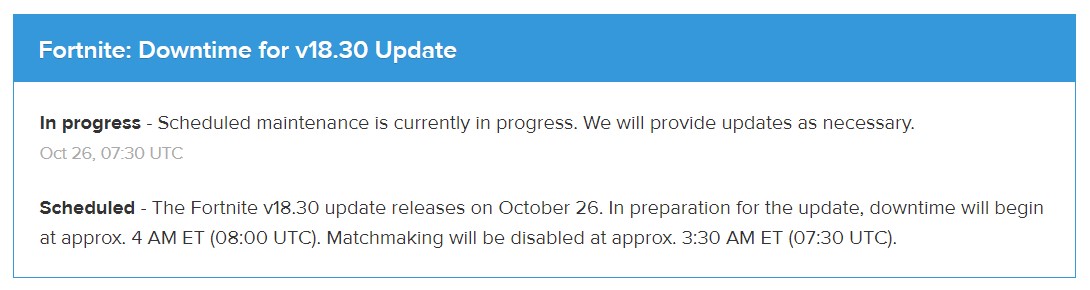
When you click on the above link, you will be shown the live status of Fortnite Servers. When we visited the site, we were informed that there is maintenance underway and players could face matchmaking and other servers related issues during the downtime.
Twitter & Facebook
We're beginning to disable matchmaking in preparation for the v18.30 update, with server downtime beginning soon.
We’ll let you all know when downtime has ended! pic.twitter.com/bZtnXcKOhw
— Fortnite Status (@FortniteStatus) October 26, 2021
Twitter and Facebook are two major social media platforms where Epic Games posts everything about Fortnite servers. If they have any scheduled maintenance, they put a post on these platforms informing fans about the same. So, whenever you face any login or matchmaking issue, visit the official Epic Games handle of Twitter and Facebook.
Downdetector
Downdetector is a third-party site that tracks the current server status of games or websites across the world. If you ever encounter the Fortnite servers not responding errors or any other server issues then visit Downdetector. Once you are on the site, search for Fornite.
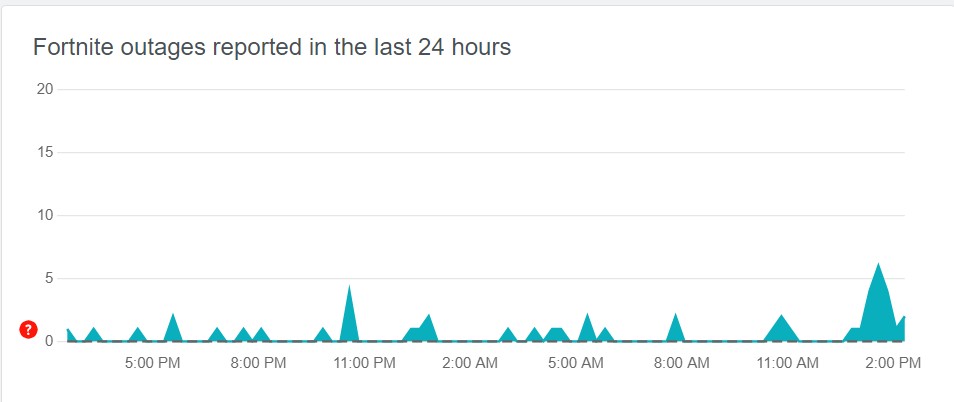
When you do so, you will be greeted with a graph showing you the number of complaints the website has received in the past 24-hour. If you take a look at the above graphs, you can see a lot of people have been complaining about Fortnite outages across the world.
How To Fix Fortnite Servers Down Issue?
Unfortunately, there are no technical ways to fix the Fortnite servers down issue. Since it is happening or occurring from the devs’ end, players have no option but to wait until the maintenance has been lifted. Once the Fortnite downtime is over, players across the world will be able to enjoy the latest version of Fornite smoothly.