
Genshin Impact is a popular Anime-theme based action role-playing game. It is a free-to-play game available on various platforms. You can enjoy Genshin Impact on your Android or iOS mobile, PC, or even on PlayStation for free. In this article, we will guide you through the steps to download Genshin Impact on your Windows 10 Pc or laptop.
So without any further delay, let us get started with steps to download and play your favorite action RPG game on your big screen.
How To Get Genshin Impact On Windows 10 PC or Laptop?
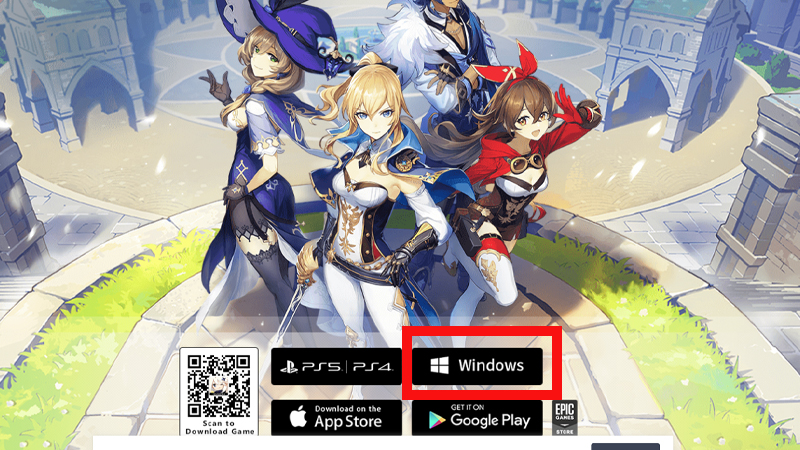
Genshin Impact is a fun action RPG game with all the amazing anime characters, weapons, and resources. You can experience it in the best graphics and animations and take up some exciting missions and events in the game. You can download this game for free on your Android or iOS mobile from the app store for free. But there are many players clueless about how to download Genshin Impact on their Windows PC.
If you are also looking for the same then here you go. Here are some easy steps to get Genshin Impact on your PC:
- Firstly, open any browser on your Windows 10 PC or laptop.
- Now Search for ‘Download Genshin Impact‘. Find the official site of Genshin Impact on your screen and click on it.
- You can also click here are we will redirect you to Genshin Impact’s official site.
- Once you get here, click on the “Windows” option on the bottom of your screen. (As shown in the above image)
- As soon as you click on the windows button the game will start downloading on your PC.
- Next, go to your downloads and install the game by clicking on the file.
- Once the game is successfully installed, launch the game, log in using your old ID or create a new one.
- Enjoy playing Genshin Impact on your Windows PC.
This is everything you need to know about how to download Genshin Impact on Windows 10. Read another article on how to solve the Formation Estate puzzle in Genshin Impact.