
Chimeraland is an open world sandbox RPG, which has finally been launched for Android, iOS and PC. Since the game has not been launched globally, a lot of fans across the world are having trouble downloading Chimeraland on PC, Android and iOS and if that’s you then look no further as we have a guide explaining how anyone can download and enjoy the game.
Before we explain how to download Chimeraland on PC, Android and iOS, let me tell you that the game is officially released in multiple regions — Singapore, Indonesia, Thailand, Malaysia and the Philippines. If you reside in any of these countries then you can easily download the game from Google Play Store and Apple Store for Android and iOS devices, respectively.
If you are residing not any of these regions/countries then you might not find Chimeraland on both Google Play Store and Apple App Store. If that’s the case then you will have to download Chimeraland from TapTap, which is a third-party site. If you don’t know how to download an application or game from TapTap then keep reading this post till the end.
Without any further ado, let’s get started:
How To Download Chimeraland From TapTap?
Here are a few simple steps that you will need to follow:
- First, download and install the TapTap application on your device (if you have not downloaded it yet)
- To download the TapTap app, click on this link.
- Once installed, launch it on your device.
- Type ‘Chimeraland’ into the search
- Select the game and then tap on the Download button. You can also download the APK by clicking on this link.
- Before you start the downloading process, make sure you have enough empty storage on your device because the size of its APK is more than 3.5GB.
- Once downloaded, you can install it by simply tapping on the APK file.
- Once installed, log in to the game using your account and enjoy the game.
- That’s it.
How To Download Chimeraland on PC?
There are two ways that can be used to play Chimeraland on PC. If you are curious to know what these two methods are and how they work then you must keep reading this post.
Download PC Version
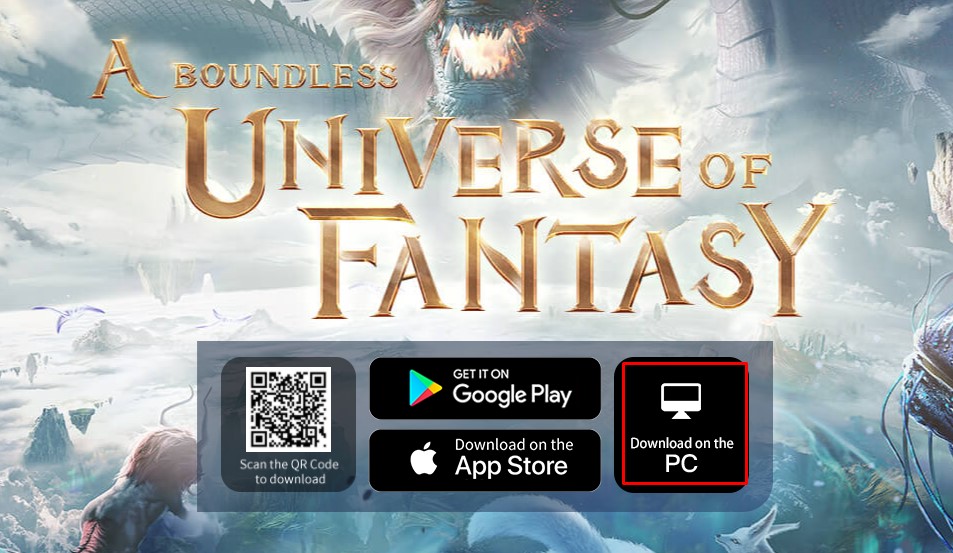
Unlike PUBG Mobile, Free Fire or BGMI, the developers of the game launched Chimeraland’s PC version as well. Yes, if you want to explore the game on a bigger screen then you will have to download its PC edition from Chimeraland’s official site. Once you are on the site, you will see the ‘Download on the PC’ option. When you click on it, its .exe file will automatically begin downloading.
Once downloaded, you will have to click on it to begin the installation process and then follow the onscreen instructions until the game is completely installed on your PC. Once done, you can enjoy Chimeraland on your PC.
Using BlueStack
Since Chimeraland’s Android and iOS version is available on Google Play Store and Apple App Store, you can use an emulator like BlueStacks to play the game on PC as well. If you don’t know how this process works then follow the given steps:
- First, Download and install BlueStacks on your PC.
- Complete Google sign-in process to access Google Play Store.
- Once signed in, search for Chimeraland on Play Store and download and install the game.
- Once installed, click on the Chimeraland icon on the home screen to enjoy the game on PC.
- That’s it.
Note: Before you start the installation process, I recommend you check the minimum and recommended system requirements of Chimeraland.
Chimeraland System Requirements
To run Chimeraland on PC smoothly, your system needs to meet the following requirements. If you don’t know what is its minimum or recommended system requirements then check this table out:
| Minimum | Recommended |
| OS: Windows 10 (or Windows That Has DirectX 11) | OS: Windows 10 (or Windows that has DirectX 11 installed) |
| CPU: Intel Corei3-10300 | CPU: Intel Core i5-10400 |
| RAM; 8GB or better | RAM: 16GB or better |
| Graphics Card: GTX 750 | Graphics Card: GTX 1060 |
That’s all you need to know about how to download Chimeraland on Android, iOS and PC.