
Close Menu
    Facebook X (Twitter) Instagram
    • About Us
    • Contact Us
    • Privacy Policy
    • Disclaimer
    Facebook X (Twitter) Instagram Pinterest Vimeo
    Games Adda
    • Gaming
    • Tips and Tricks
    • Tech
    • Best Buy
      • Gaming Mouse
      • Headphones
      • Laptops
      • Smartphones
      • Smartwatches
    Subscribe
    Games Adda
    Home » Gaming » How To Change Name In OSRS
    Gaming

    How To Change Name In Old School Runescape (OSRS)

    Samantha SurveBy Samantha SurveJuly 12, 2023Updated:July 12, 2023No Comments2 Mins Read
    Share Facebook Twitter Pinterest LinkedIn Tumblr Reddit Telegram Email
    how to change name in old school runescape
    Share
    Facebook Twitter LinkedIn Pinterest Email

    Old School Runescape was officially released in 2017, and we understand if you kept a name that you now want to change. It is pretty simple to change your name in the game. Unlike some other games that don’t allow players to change their name, OSRS does allow such changes and this is how.

    How to Change Name in Old School Runescape
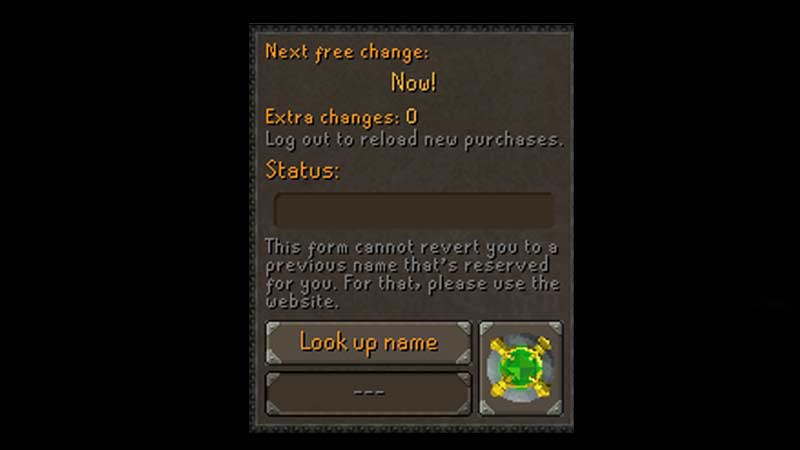
    change name in old school runescape

    1. Go to Settings, which is denoted by the Wrench tool.
    2. Then open Chat and Notifications which has a green person and a dialogue box.
    3. There you will find the Display name.
    4. Note that changing the name in OSRS is not always free.
    5. There are certain intervals for a free change.
    6. You will have to wait for the next free change and when it shows “Now”, you can change your name.
    7. Type in your name below Look up name.
    8. Then select Look up name, to see if it is available.
    9. Under the Status bar, it will show you if the name is taken or not taken.

    This procedure is also done so that there are no inappropriate names used. You can also search for other in-game name options if you want to. Your new name will now display in your game. If you are somehow not satisfied with the new name, you will have to log out of the game and log in again. This is done so that you get your free name change token again. Not just that if you have redeemed a name change bond recently then you will have to log in and log out to change your name.

    This was all on how to change your name in Old School Runescape. If you found this article helpful you can also check out how to make pickaxe in OSRS or how to increase inventory in Old School Runescape.

    Gaming Gaming Guides Trending
    Share. Facebook Twitter Pinterest LinkedIn Tumblr Email
    Previous ArticleHow To Make Or Get Pickaxe In Old School Runescape
    Next Article How To Put People In The Jeep In Melon Playground
    Samantha Surve

    This is Samantha, she is a proud Slytherin. Along with her never ending love for bookstores, arcades, Hogwarts Legacy & Minecraft.

    Related Posts

    Gaming

    From Lockdown Epiphany to India’s First “Phygital” Arcade: The Claw King Story

    August 19, 2025
    Gaming

    The Biggest Esports Tournaments to Watch in 2025

    March 25, 2025
    Gaming

    Experience Elden Ring Like Never Before: Ranni Demigod Backpack Mod

    July 10, 2024
    Add A Comment

    Comments are closed.

    Facebook X (Twitter) Instagram Pinterest
    • About Us
    • Contact Us
    • Privacy Policy
    • Disclaimer
    © 2026 ThemeSphere. Designed by ThemeSphere.

    Type above and press Enter to search. Press Esc to cancel.