
Pokemon Unite is a MOBA game where you battle against opponents in a 5v5 format gameplay. Now, usually in MOBA games, there are two kinds of enemies you need to look out for. One is the opponent team members and the other is wild creatures. Similarly, there are certain obstacles that you might face while attacking enemies. Here, you will see the targeting and aim assist guide in Pokemon Unite. Glance through this guide to learn how to attack better in the game.
How to Target and Aim Effectively in Pokemon Unite?
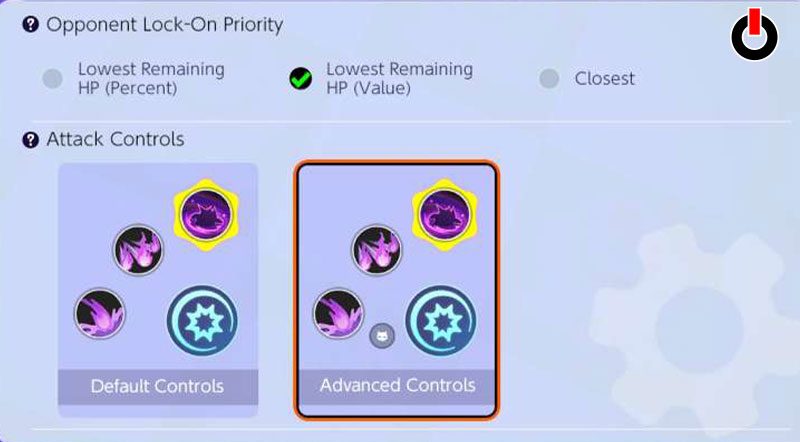
You may have experienced that your Pokemon is attacking the wild Pokemon when it is nearby amidst the fight. It happens because you may not have set targeting and aim assist in Pokemon Unite. Unfortunately, in the new update, the aim assist feature seems to be no longer a part of the settings menu. But, there are other settings you can control to improve your aim.
You can change the attacking priority in the settings menu in the game. In the Settings menu, you will notice several options in the Control tab. Under the heading Basic Control Settings, you can set your Opponent Lock-On Priority. There are three options, Lowest HP Percent, Value, and Closest Opponent. You can select either of them that suit your gameplay.
Apart from that, you can choose your attack controls among Default or Advanced. There is also a Lock-On Icon feature that lets your Pokemon fixate its attack on a specific target. Also, ensure that you have disabled the Move Aim Snaps to Nearby Targets feature. This feature shifts your aim when you’re near another enemy or wild Pokemon. This may cost you a revive during battle.
Tweaking these settings a bit can affect your gameplay and give you an advantage over your opponents. Now that you know about them, you can go ahead and change the settings as they suit you. This is all you need to know about targeting and aim assist in Pokemon Unite.
Hopefully, this guide was helpful to you. While you’re here, you can feel free to browse through other similar articles such as What are the Unchangeable Features in Pokemon Unite? and Tips and Strategies to Win.