
Close Menu
    Facebook X (Twitter) Instagram
    • About Us
    • Contact Us
    • Privacy Policy
    • Disclaimer
    Facebook X (Twitter) Instagram Pinterest Vimeo
    Games Adda
    • Gaming
    • Tips and Tricks
    • Tech
    • Best Buy
      • Gaming Mouse
      • Headphones
      • Laptops
      • Smartphones
      • Smartwatches
    Subscribe
    Games Adda
    Home » Gaming » CODM 1v1 Match Guide
    Gaming

    How to Play 1v1 Matches in COD Mobile In 2022?

    Omair IqbalBy Omair IqbalJanuary 21, 2022No Comments2 Mins Read
    Share Facebook Twitter Pinterest LinkedIn Tumblr Reddit Telegram Email
    COD Mobile 1v1 matches
    Share
    Facebook Twitter LinkedIn Pinterest Email

    It has been more than two years since Call of Duty Mobile was officially launched for Android and iOS devices but the popularity of this free-to-play shooter game is showing no sign of slowing down. The reason why people are loving COD Mobile is it not only lets its players play it with their friends but also creates a private room to play 1v1 matches.

    Also Read | Every Nerfs and Buffs of COD Mobile Weapons

    With the latest update ‘The Heist’, a lot of players have downloaded this free-to-play shooter game and they are having issues playing 1v1 matches in CODM. If you too are having the same issue then look no further as we have a step-by-step guide explaining the same in the simplest way possible.

    Without any further ado, let’s get started:

    How To Play 1v1 Matches in CoD: Mobile In 2022?

    Playing 1v1 matches in CODM requires having a private room for you and another player. If you are new to this game and don’t know how to create a private room in COD Mobile then follow the steps written below:

    • Launch COD Mobile on your phone.
    • Tap on the Multiplayer option from the side menu.
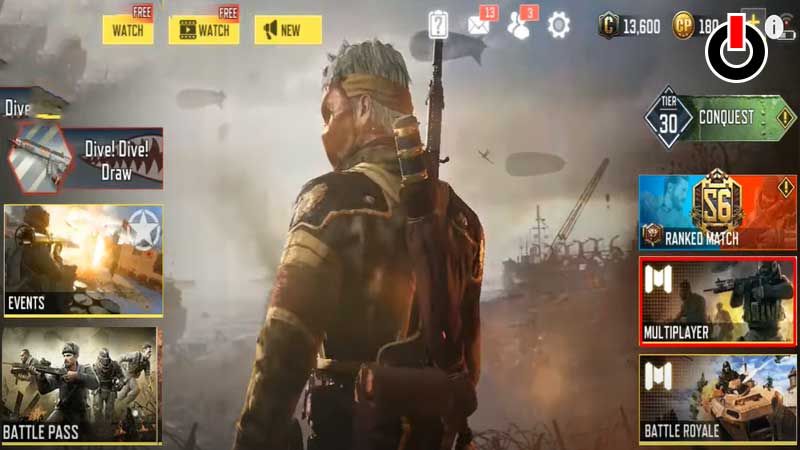
    COD Mobile 1v1 Matches

    • Tap on the Hamburger icon located on the top right corner of the screen.
    • There, you will have to tap on the ‘Private’ option.
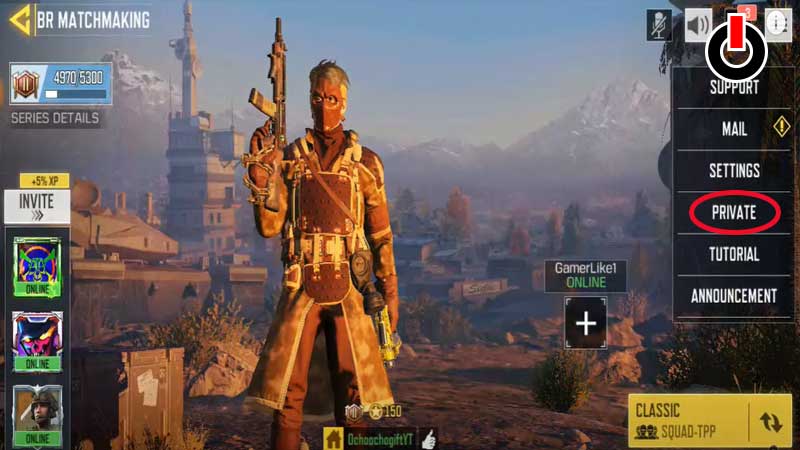
    COD Mobile 1v1 Matches

    • Go to Mode Change and scroll down until you see 1v1 Duel.
    • Now, you will have to select the player who you want to play matches in 1v1 in COD Mobile by pressing on the ‘+’ icon next to their name.
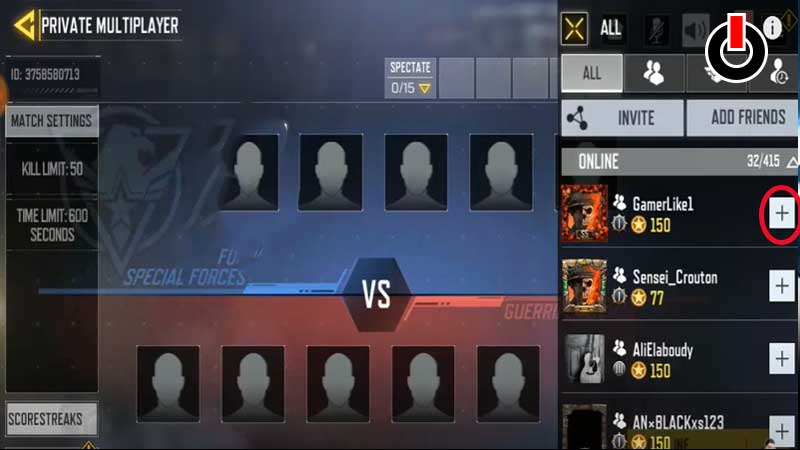
    COD Mobile 1v1 Matches

    • Wait until your friend accepts the invitation.
    • Once accepted, tap on the ‘Start’ button to start the match.
    • That’s it.

    That’s everything you need to know about how to play 1v1 matches in Call of Duty Mobile.

    COD Mobile Guides Tips and Tricks
    Share. Facebook Twitter Pinterest LinkedIn Tumblr Email
    Previous ArticleAll Weapon Buffs and Nerfs Of COD Mobile Season 1 Heist Update
    Next Article Top 5 Best Faction Servers In Minecraft (November 2022)
    Omair Iqbal
    • X (Twitter)

    Related Posts

    Gaming

    From Lockdown Epiphany to India’s First “Phygital” Arcade: The Claw King Story

    August 19, 2025
    Gaming

    The Biggest Esports Tournaments to Watch in 2025

    March 25, 2025
    Gaming

    Experience Elden Ring Like Never Before: Ranni Demigod Backpack Mod

    July 10, 2024
    Add A Comment

    Comments are closed.

    Facebook X (Twitter) Instagram Pinterest
    • About Us
    • Contact Us
    • Privacy Policy
    • Disclaimer
    © 2026 ThemeSphere. Designed by ThemeSphere.

    Type above and press Enter to search. Press Esc to cancel.