
Roku Tv serves as one of the best platforms to have access to different streaming media content on different apps like Netflix, Hulu, etc. But recently there are many Roku users facing trouble while they enjoy streaming online. Many people are facing problems like Roku Tv Not Working, Roku Tv being stuck on the loading screen, or remote not responding issues.
If you are also facing any of the above-mentioned issues on your Roku Tv then look no further as we have you covered. Here is a complete guide explaining all the steps to fix Roku Tv not working issue. So without any further ado, let us get started with it!
Also, Read| How To Cast Oculus Quest 2 To Roku TV?
Table of Contents
Roku Tv Stuck On Loading Screen Issue Fix:
Roku Tv not working or stuck on the loading screen are the common issues and can be fixed by a few simple steps. Roku Tv usually stops working or has trouble operating when it is not updated or the update isn’t completed. So all you can do to fix the issue is restart your device, try and update it again, or reset it.
Don’t know how to do it? Then here is how to do that!
How To Restart Roku Tv?
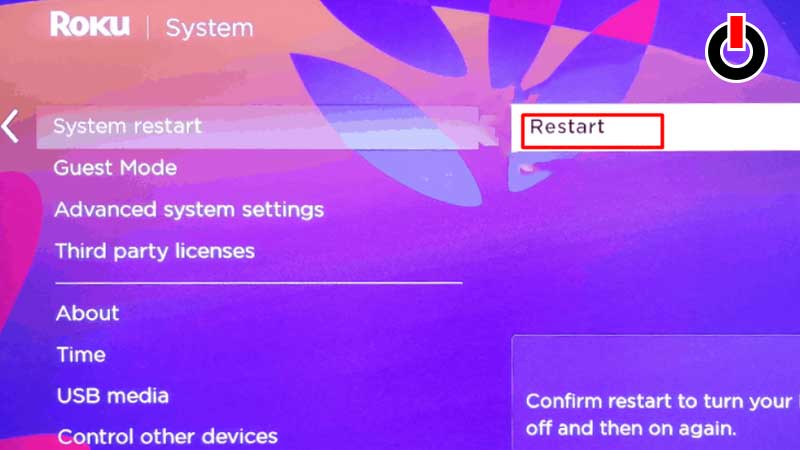
There are two ways in which you can reset your Roku Tv. If your screen is responding then you can do it using your remote. And if your screen is stuck on the loading screen then we will show you how to do it manually!
Here are all the steps to Restart Roku Tv using Remote:
- Press the ‘Home’ button on your remote, go to ‘Settings’ using navigation keys, and press ‘Ok’.
- Now scroll down and find ‘System’ in the list and open it by again pressing the Ok button.
- Next is to find and click on the ‘System Restart’ option and click on the ‘Restart’ option on the right side of your screen.
- Wait for a few seconds until the device restarts and you can enjoy streaming your favorite movies and shows on Roku Tv!
Steps to restart Roku Tv Manually:
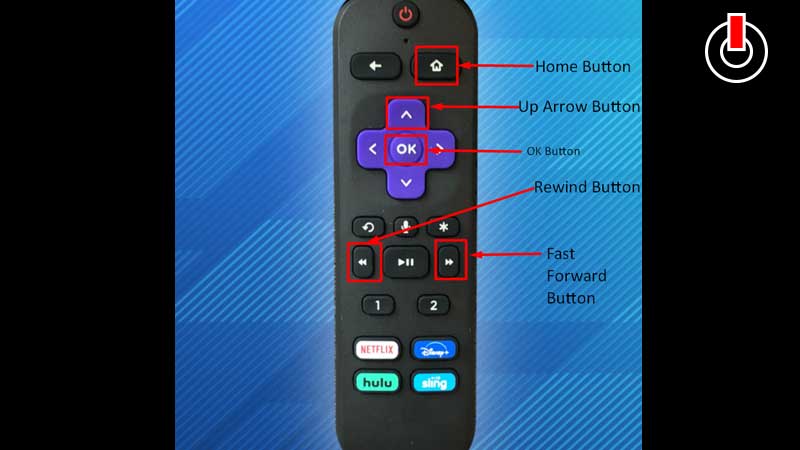
If your Roku Tv is stuck on the loading screen and not responding then you can restart it by just pressing a few buttons on your remote in the said sequence. Make sure you follow the sequence correctly to restart Roku Tv manually.
- Home button >> 5 times
- Up Arrow button >> 1 time
- Rewind button >> 2 times
- Fast Forward button >>2 times
Press these buttons in the mentioned sequence to restart it manually and fix Roku Tv not working issue!
How To Update Roku Tv?
There is a chance if your device is not updated with the latest version then you might face the Roku Tv not working issue. Hence make sure your device is up to date before jumping on to the next fix! Check out the steps to check for updates on your Roku Tv.
- Press the ‘Home‘ button and head to ‘Settings‘.
- Now go to ‘System‘ by using navigation keys and press ‘Ok‘.
- On the next screen find ‘System Update’ and click on it.
- Now on your right screen, you will see an option called “Check now” select it to check for updates.
- If new updates are available download and install them, restart the device, and enjoy streaming online.
How To Reset Roku Tv?
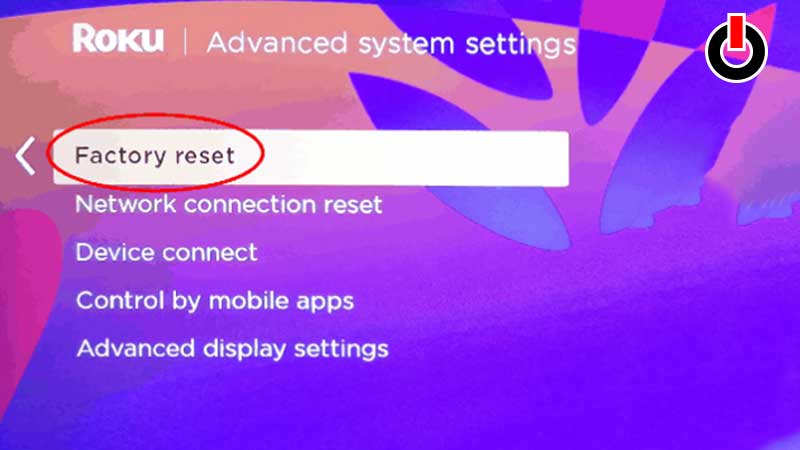
If the above solutions do not work then you can try and RESET your Roku Tv to fix the issue you are facing. But Resetting your device is a bit risky as it will delete all your settings and preferences that you have made so far. You will have to again start from page one and set it all over again!
Like restarting, Factory Reset can also be performed by using remote or manually. Read further to know how to do it.
Steps to reset Roku Tv using Remote:
- Press the ‘Home’ button on your remote, go to ‘Settings’ using navigation keys, and press ‘Ok’.
- Now scroll down and find ‘System’ in the list and open it by again pressing the ‘Ok’ button.
- Now go to “Advanced System Settings” and press ‘Ok’.
- Find the ‘Factory Reset’ option on the next screen and press the Ok button again to reset your Roku Tv.
Steps to Reset Roku Tv Manually:
To Reset your Roku Tv Manually make sure your device is On and then find and press the Reset button for 1o seconds until the Roku logo appears again. This will help you reset the device and fix all the small or big issues you are facing!
If any of the solutions do not work and you are still facing the issue then click on the link and contact Roku Support to get help on the same.
That’s all you need to know about how to fix Roku Tv not working issue on your device.