
Discord is widely popular among gamers and is such a great platform for communities. It rarely has any issues however occasionally you might face the Discord No route error.
This error comes up when you try to join a voice call in a server or even when you call someone personally on discord. The only thing most people try to fix this error is to leave the join and try to join it back. That, however, does not fix anything. We have a few ways how you can fix the discord no route error.
Why does the Discord No route Error happen?
The main reason you will face this issue is due to some kind of an IP block on your IP or if your IP is dynamic. It could also be due to a firewall that is blocking discord from using all its features. Discord could also be blocked from your network admin or maybe the Server region is not compatible with your discord client.
Discord No Route Error Fixes
Here are some of the ways you can fix the discord no route error.
The Basic Restart
This is probably one of the most common ways of fixing any problems. However, most people only restart Discord and as the result, the problem continues. As the No Route error happens due to problems with Dynamic IP, it is important you restart your Modem and your computer both. Try to connect to a discord call after restarting both and check if it works.
Check your Firewall or Antivirus
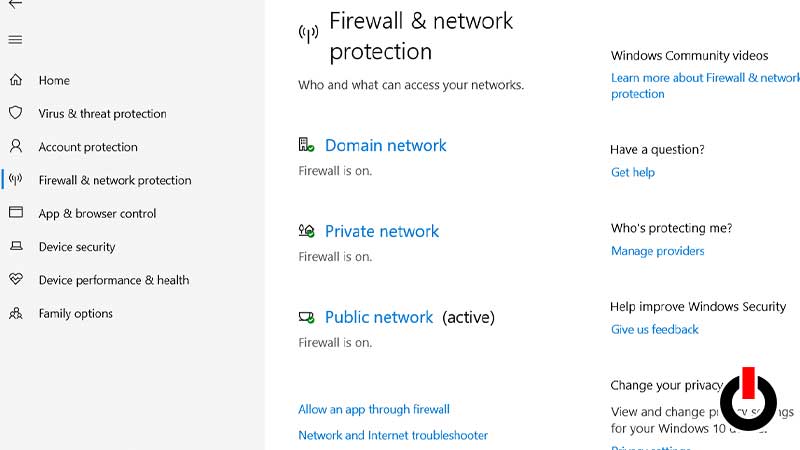
If you have restarted your computer and your router but are still unable to join a server call, try this method. Your discord application may have been blocked off by your antivirus software or by Windows Defender itself. You can go to your antivirus application and check if it is blocking Discord. If it is, remove the block and restart Discord. To check if it is the Windows Defender follow the steps below:
- Click on Start Menu and search Settings.
- Go to Update and Security > Windows Security.
- Click on Open Windows Security.
- Go to Firewall & network protection and click on Allow an app through firewall.
- Click on Change Settings, scroll to find Discord, and then make sure the boxes next to it are ticked.
- Restart Discord now and try to join a call.
Flush your DNS
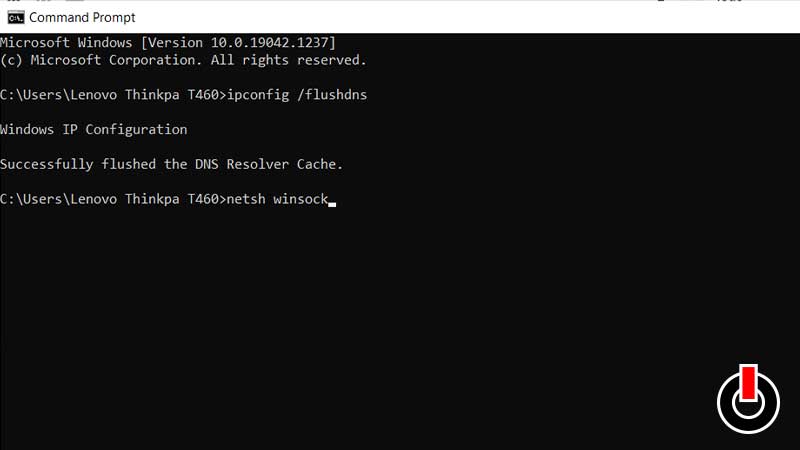
This is another way you can fix your IP from changing constantly and having it blocked by Discord. Follow the steps below to reset your IP settings.
- Type cmd on start and Open Command Prompt as Administrator.
- Type ipconfig /flushdns and press Enter.
- It should say that it has successfully flushed the DNS.
- Type netsh Winsock reset and press Enter.
- Restart your PC and this will resolve your issue.
Change Discord Settings
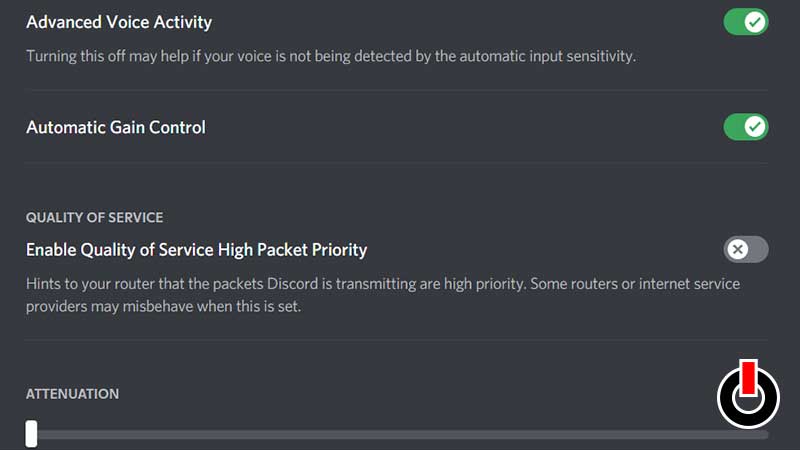
If none of the above methods worked for you, it is possible the discord settings are causing a problem for you. So, follow the steps below to change your discord settings to fix the discord no route error.
- Open Discord.
- Click on the Settings button.
- Go to Voice and Video.
- Scroll down to locate Enable Quality of Service High Packet Priority and make sure you disable it.
These were all the steps that we think will help you resolve the discord no route error. If it doesn’t work still, it can be a discord server issue. Contact discord support or just wait for a few hours for the problem to be fixed. Here is how you can get free Youtube premium with Discord nitro.