
The Low Client FPS error is something that has recently started to come up a lot for most players in Valorant. This usually happens when your game lags and it lowers your FPS in-game. Your ping rate might also rise when you get this error. This can be very annoying for players who are playing competitive mode or even just a normal game mode like deathmatch.
There are multiple ways you can solve this error which we are going to mention in this guide.
Table of Contents
Why does the Low Client FPS issue show in Valorant?
Mostly, this Valorant low client FPS error happens if there is any background recording software running. PCs and Laptops with the AMD Graphics Card seem to be affected the most by this issue due to the Instant reply feature in Radeon.
For people with different graphics cards or no graphics card at all, it might be a resolution problem and can be easily fixed.
How to Fix Valorant Low Client FPS Error In 2022?
AMD Users
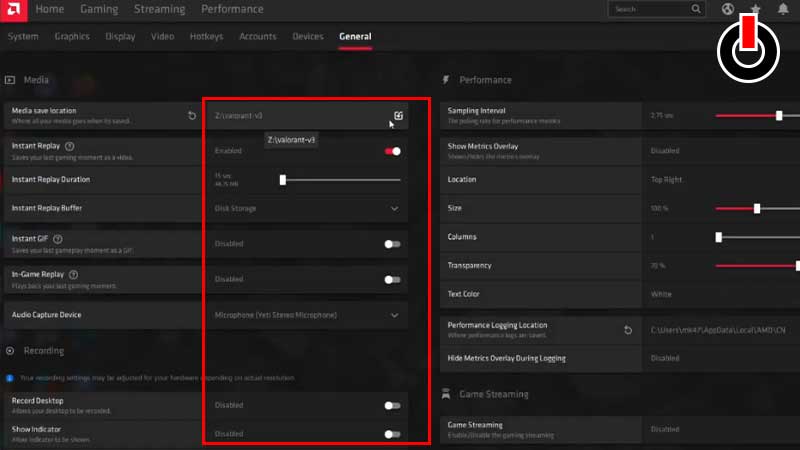
If you have an AMD graphics card and are getting the Low client FPS error, follow these steps to fix it.
- First, end all Valorant applications and Radeon Processes by Ending Task.
- Open AMD Radeon Software as Administrator.
- Disable all the options in Media and Recording section.
- Run Valorant as Administrator.
This will fix the Valorant Low Client FPS issue.
How to Fix Valorant Low Client FPS Error without Graphics Card
Follow these steps to solve the error.
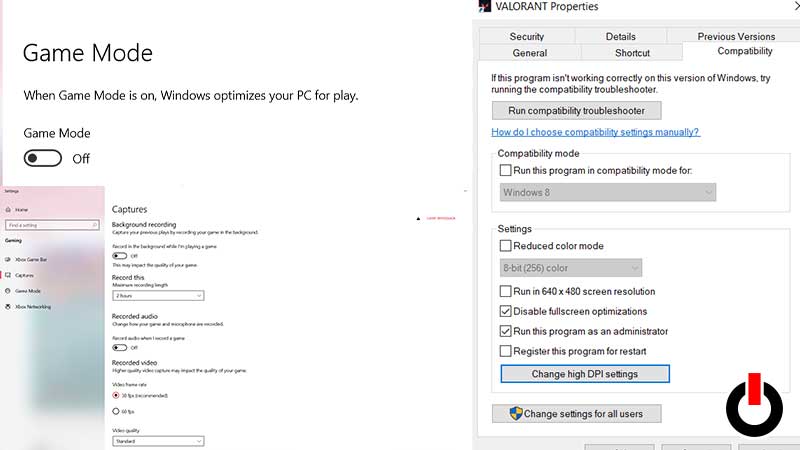
- Right-click on Valorant Desktop Icon. Click on Properties.
- Go to Compatibility.
- Tick the box that says Disable fullscreen optimizations.
- Select Run as Administrator.
- Click Apply and Done.
Disable Game Mode
Game Mode usually takes up a lot of processing power on your computer. Here is how you can disable it.
- Search Game Mode on your computer and Open it.
- Turn Game Mode off.
- Go on to the Capture section.
- Disable all Recording options like the Image shown below.
- Run Valorant.
- Go to Settings in Valorant.
- Click Video then go to General under Video > Display Mode > Windowed Fullscreen.
Edit Valorant Configuration File
- Go to C drive on your computer and locate Users.
- Click on your Admin user > App Data.
- Select Local > Valorant > Saved
- Click on Config and Open the topmost file with numbers and letters.
- Select Windows and open GameUserSettings.
- Scroll down to locate ScalabilityGroups and make sure the settings are set to this.sg.ResolutionQuality=50.285702
sg.ViewDistanceQuality=0
sg.AntiAliasingQuality=0
sg.ShadowQuality=0
sg.PostProcessQuality=0
sg.TextureQuality=0
sg.EffectsQuality=0
sg.FoliageQuality=0
sg.ShadingQuality=0 - Click on Save and Close the Notepad.
- Now right-click GameUserSettings and go to Properties.
- Make sure the Read-Only Box is Unticked.
These steps will remove the Valorant Low Client FPS Error. If it still doesn’t, then it could be a problem with your Riot Account and we recommend you to contact Riot Support. Check out how to change Valorant Tactical Chat Settings here.