
With the global version released the hype around Punishing Gray Raven (PGR) has skyrocketed. Players have been playing the gacha game non-stop but only a few have unlocked the multiplayer co-op event. Here’s how you can unlock the multiplayer co-op event in Punishing Gray Raven (PGR).
How To Unlock Multiplayer Co-op mode In Punishing Gray Raven (PGR)?
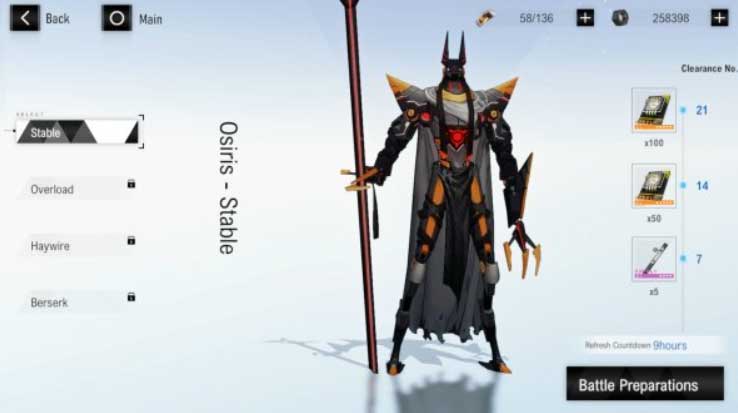
There are multiple modes in PGR and to unlock all of them you have to reach a certain level in the story. Players will unlock the multiplayer co-op mode once they have reached level 35.
Once you reach level 35 you will be able to participate in the Co-op event. Follow the below steps to know how to start the multiplayer co-op event.
- Click on the big “battle” button on the right of your home screen
- You will find an “event” button on your bottom right, click on the “event” button and then click on the co-op banner.
- You will see four stages: Stable, Overload, Haywire, and Berserk. All of them are unlocked at levels 35,45,55 and 60 respectively.
- Select the stage or boss you want to play and then press the Battle preparations button on the bottom right.
- You can press the “Quick match” button or the “create room” depending upon what mode you want to play.
- The quick match will directly put you in the room with random players
- After pressing the “create room” button click on the “+” sign next to your character, this will display your friends and enable you to send an invite to any of them.
- Once your friends have accepted the invite and are ready click on the “Begin mission” button to start the game.
How To Add Friends In Punishing Gray Raven (PGR)
Players can add their friends from the “friends” tab available on the home screen. You can also accept the requests you received from your friends under the same tab. It is necessary that you add your friends as only then you’ll be able to invite them for multiplayer co-op matches and events.
That’s all for this one, do check out the Punishing Gray Raven Tier list to get the best characters in the game.