
Ever since Krafton officially launched the early APK of Battlegrounds Mobile India on Google Play Store, fans took to social media and complained about numerous errors that they are encountering while playing games on Android and PC.
What irritating BGMI players the most is the ‘server busy restrict area’ error. There are tons of fans who have recently been searching for ways to fix the ‘BGMI server is busy’ error and if that’s you then look no further as we have got you covered.
Also Read | BGMI: How To Fix “There Was A Problem While Parsing The Package” Error
How To Fix BGMI Server Is Busy Error In 2021
Most of the users who are facing this issue are using emulators to play Battlegrounds Mobile India on PC and Laptop. When the number of users complaining about the ‘BGMI Server is Busy’ error increased significantly, one of the Battlegrounds Mobile India admins took to Discord and answered this query.
In its answer, he clearly mentioned that majority of users who are facing this issue are either trying to play BGMI on PC using emulators or trying to play the game outside of India. Apart from mentioning the reason why users are having a ‘BGMI server is busy’ error, he also gave a bunch of solutions that might resolve this issue permanently.
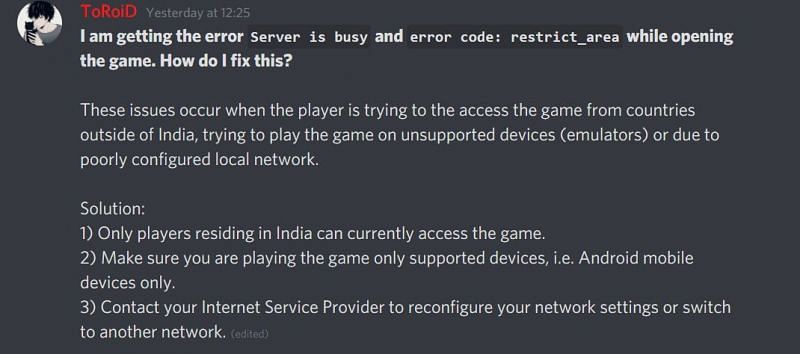
Here are some ways to fix the BGMI server is busy error in 2021:
- Make sure you live in India because people living in India can only access the Battlegrounds Mobile India right now.
- Make sure you are playing BGMI on only supported devices. Currently, the game is only compatible with Android.
- Don’t use an emulator to play BGMI on PC and laptop because the game is still in development.
- Make sure your internet connection is fast and reliable because numerous players have reported having fixed this issue by switching to another network.
- If you reside outside of India, there are no ways that can fix the BGMI server is a busy issue so far.
That’s everything you need to know about how to fix the ‘BGMI server is busy’ error in 2021.